.svg)
.svg)
.svg)


.svg)


.svg)
.svg)

.svg)

Key Takeaways:
- A strong database migration checklist protects data integrity at every phase, from assessment through post-cutover validation.
- Testing with production-sized data and a verified backup are non-negotiable steps in any cloud database migration.
- A tested rollback plan and close monitoring after cutover are what separate a smooth migration from a costly one.
- Geopits is an ISO-certified database and cloud engineering partner, trusted for complex migrations across AWS, Azure, and GCP.
- Geopits helped a retail enterprise cut daily data processing time from over 10 hours to just 45 minutes using a unified Azure lakehouse.
A single missed dependency, one skipped backup test, or one weak rollback plan can turn a planned two-hour database migration into a week of downtime and lost revenue. That is not just a technical problem. It is a business risk that touches customer trust, compliance, and revenue.
The cloud is now the default home for enterprise data. It cuts hardware costs and scales up or down as demand changes. Teams also get built-in tools for backup, security, and disaster recovery. These are hard to match with on-premises systems. Businesses that delay a move to the cloud often pay more to maintain aging infrastructure. Meanwhile, competitors move faster and spend less. The real challenge is not whether to move to the cloud. It is how to get there without losing data or trust along the way.
This database migration checklist gives you a clear, step-by-step way to move your database to AWS, Azure, or GCP without losing data. It is built for enterprise teams who need a repeatable process, not a one-time fix.
What is Database Migration?
Database migration is the process of moving data from one system to another. This can mean moving from an on-premises server to the cloud. It can also mean moving between two different cloud companies. A migration is more than copying files. It includes moving the schema, the stored procedures, and the relationships between tables. It also means keeping every record accurate during the move.
Why Enterprise Database Migrations Fail
Most failed migrations do not fail because of bad technology. They fail because of poor planning. Teams rush the timeline, skip validation, or assume the new environment will behave exactly like the old one. It rarely does.
The main risks in any database migration checklist are a few common issues:
- Data loss: Records go missing during transfer or get corrupted mid-migration.
- Downtime: Applications go offline longer than the business can afford.
- Compatibility issues: Stored procedures, data types, or extensions do not work the same way on the new platform.
- Failed cutovers: The final switch to the new database breaks connections or causes errors that testing never caught.
This checklist is for CTOs, database administrators, IT directors, and cloud architects who are planning or leading a database migration to AWS, Azure, or GCP. If you manage a team responsible for enterprise data, this guide gives you the structure to move with confidence. By following this database migration checklist, you will be able to:
- Build a migration plan that protects data integrity from start to finish
- Choose the right cloud database migration tools for your environment
- Run a tested rollback plan before you touch production
- Validate that no data was lost after the cutover
The Complete Enterprise Database Migration Checklist
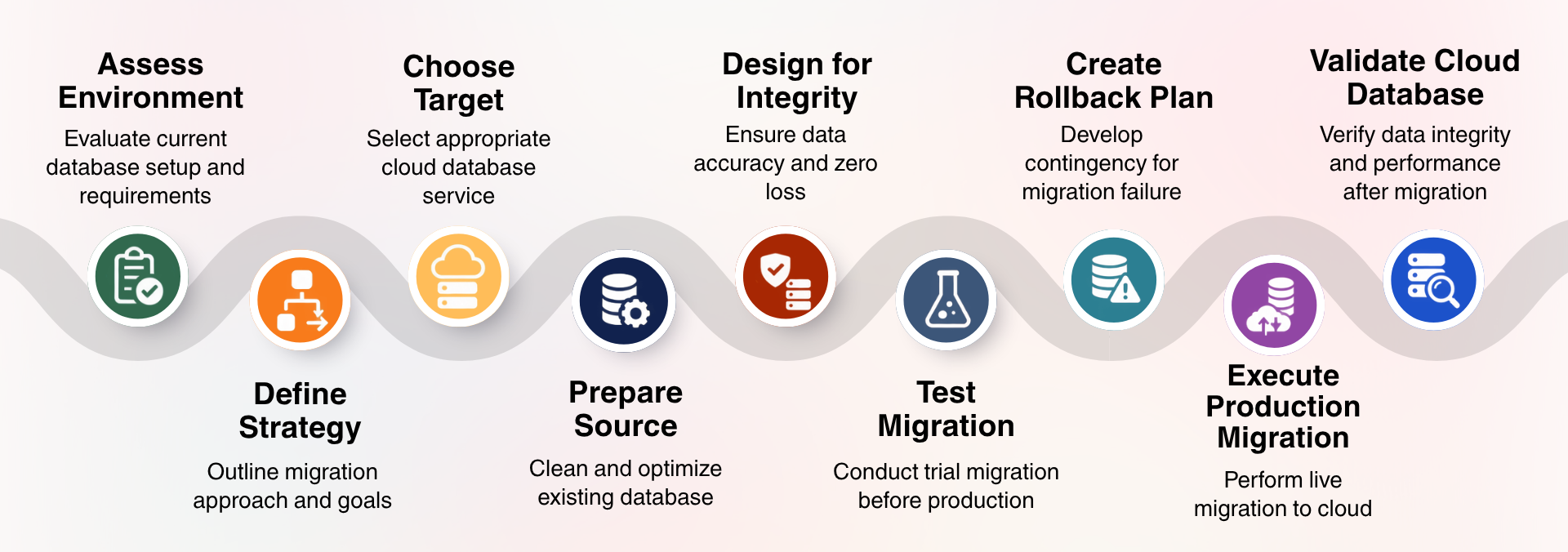
A successful database migration checklist has nine steps. It starts with assessing your source database and ends with validating data after the move. Any team can use these database migration tools to move to AWS, Azure, or GCP. The steps below help you build a database migration strategy that keeps your data safe at every stage.
- Assess your existing database environment
- Define your migration strategy
- Choose the right cloud database target
- Prepare and clean the source database
- Design for data integrity and zero data loss
- Test the migration before the production cutover
- Create a rollback plan before cutover
- Execute the production migration
- Validate the cloud database after migration
Phase 1: Assess the Existing Database Environment
Every good database migration checklist starts with an honest look at what you already have. Skipping this step is the number one reason migrations run over budget and over time.
Start by listing every database, instance, and schema your applications rely on, including the ones your teams may have forgotten about. Note the exact engine and version for each one, since some cloud database migration tools only support certain versions, and this detail shapes your entire plan. Next, map every application, script, and service that reads from or writes to the database. A missed dependency here is one of the most common causes of a broken cutover.
You also need to document how data moves between systems, including APIs, ETL jobs, and third-party tools this connects with. Measure your current data volume and growth rate, since the volume affects how long the migration takes and which approach fits best. Check whether your industry requires data to stay within a specific country or region, and confirm these requirements before you pick a cloud provider or region.
Finally, agree on your recovery point objective and recovery time objective. These two numbers tell you how much data loss and downtime your business can actually tolerate, and they should drive every decision that follows in this database migration checklist.
Phase 2: Define Your Migration Strategy Before Moving Any Data
A strong migration strategy is the foundation of any database migration checklist. Without one, teams often start moving data before they agree on what success looks like.
- Offline migration, where the source database goes down during the transfer
- Online migration, where the database stays live using replication
- Near-zero-downtime migration, using continuous sync and a short final cutover
- One-time bulk transfer for smaller or less critical databases
- Continuous replication and cutover for large, always-on systems
Define success criteria: Decide as a team what "zero data loss" actually means for your organization. Agree on acceptable downtime, data validation requirements, and performance benchmarks the new system must hit after going live.
Build the migration runbook: Document roles and responsibilities, escalation paths, a realistic timeline, and a communication plan. This runbook becomes your single source of truth during the migration.
Phase 3: Choose the Right Cloud Database Target
Picking the right platform shapes the rest of your cloud database migration. Each provider fits different needs. If you migrate the database to AWS, Amazon RDS and Amazon Aurora cover most managed database needs, and AWS Database Migration Service handles continuous replication with minimal downtime for large, always-on systems.
To migrate an SQL database to Azure, Azure SQL Database suits smaller workloads, while Azure SQL Managed Instance offers broader SQL Server compatibility. Azure Database Migration Service gives teams a guided, low-friction path for SQL Server and MySQL workloads.
For GCP, Cloud SQL handles standard managed databases, and AlloyDB fits PostgreSQL workloads needing higher performance. Google Cloud Database Migration Service now includes AI-assisted schema conversion for a simpler move.
Phase 4: Prepare and Clean the Source Database
A clean source database is the foundation of a smooth database migration checklist. Skipping this step often causes slow transfers and hidden errors later.
Start with a verified backup. Take a full backup, capture transaction logs or point-in-time recovery data, and actually test the restoration process. A backup you have never restored is not a real backup, and this single step protects you from most catastrophic failures.
Next, clean up unnecessary data before you move it. Archive obsolete records, remove redundant data where it makes sense, and flag oversized tables and objects that could slow down the transfer. A lighter source database moves faster and validates more easily on the other end.
Finally, resolve compatibility problems before migration begins. Check for unsupported data types, deprecated features, stored procedures, triggers, character sets, collations, and any engine-specific extensions. Resolving these issues now costs far less than fixing them after cutover, when your database migration tools for production have already moved live traffic.
Phase 5: Test the Migration Before Production Cutover
The best way to catch migration failures early is to run a full test migration using production-sied data before touching the live environment. Run a pre-production migration with data volumes that match what you actually run in production. Small test sets hide the problems that only show up at scale. Test peak-load scenarios too, and time the entire run. That number becomes your estimate for the real cutover window.
Once the test run finishes, validate completeness. Row counts, manual sampling, checksum comparisons, and a full reconciliation report will tell you if anything is missing or duplicated. From there, test application compatibility: connection strings, queries, stored procedures, ORM behavior, and every integration touching the database. Performance testing comes last. Query latency, throughput, connection limits, and failover behavior under real load tell you whether the new environment is actually ready for production traffic.
Phase 6: Create a Rollback Plan Before Cutover
A rollback plan protects the business if a migration cutover fails, and no migration should go live without one tested in advance. Start by defining rollback triggers. Data validation failure, replication lag beyond an acceptable range, application errors, or a performance drop below an agreed threshold are common ones worth setting thresholds for.
Document the actual rollback procedure next, not just the triggers. Who has the authority to call it? How long the rollback window lasts. Which database stays the source of truth? What steps reverse DNS or connection settings and roll back the application? Writing this down before cutover turns a possible crisis into something the team can execute calmly.
Phase 7: Execute the Production Migration
A production migration succeeds when the pre-cutover checks, the cutover itself, and the post-cutover validation all happen in a fixed, rehearsed order. Before cutover starts, confirm the basics are done: final backup verified, stakeholders notified, monitoring active, rollback plan approved, replication healthy, validation scripts ready, and on-call teams standing by.
During cutover, freeze writes if your strategy calls for it, finishes the final synchronization, validates critical datasets, switches application connections over, and monitors errors and latency as traffic moves. Right after cutover, check application health, database availability, data integrity, performance, and replication status immediately, not the next morning. Small issues caught in the first hour rarely turn into big ones.
Phase 8: Validate the Cloud Database After Migration
A migration is incomplete once the cutover finishes. It is complete once validation confirms the data and the environment both hold up. Compare source and target data directly. Row counts, checksums, missing records, duplicate records, and referential integrity checks confirm every record made the trip intact. Monitor the new environment for at least the first few days. CPU, memory, storage, IOPS, query latency, connection saturation, and error rates will surface any issue before it reaches users.
Close the loop with a security and compliance check. Encryption, IAM and access controls, network rules, audit logging, backup retention, and data residency all need to match what your organization requires, not just what the cloud provider defaults to.
AWS vs. Azure vs. GCP: Database Migration Considerations
Common Database Migration Mistakes That Cause Data Loss
Database migration data loss usually happens due to skipped backups, poor schema mapping, and a lack of automated validation testing.
- Skipping or Failing Backups: Running live migrations or schema alterations without a verified, isolated point-in-time backup or rollback snapshot.
- Mismatched Schemas and Data Types: Forgetting to account for character encoding differences, column truncations, or precision loss during numeric conversions.
- Inadequate Dry-Run Testing: Executing the primary migration directly on production data without running iterative rehearsals in a staging environment.
- Ignoring Constraints and Triggers: Leaving foreign key constraints, cascading deletes, or active database triggers enabled during bulk imports, which can silently wipe or corrupt related child records.
- Zero Reconciliation Verification: Failing to perform post-migration checksums, row-count audits, or value-level comparisons between the source and target databases.
Why Geopits is the Right Partner for Your Cloud Database Migration
Geopits is an ISO-certified database and cloud engineering partner that helps enterprises migrate, modernize, and manage their data without downtime or data loss. The team has handled complex migrations of cloud databases across AWS, Azure, and GCP for retail, insurance, and SaaS companies, using the same validation and rollback discipline covered in this database migration checklist.
Geopits helped a retail enterprise running 600+ stores unify scattered SQL Server, API, and flat file data into a single Azure Databricks lakehouse. Daily sales processing that once took over 10 hours dropped to just 45 minutes, giving the business faster access to insights and a single source of truth across teams.
Conclusion
A successful cloud database migration comes down to preparation, not luck. This database migration checklist exists to catch risks before they become real problems. Assessment prevents surprises. Testing catches issues early. A tested rollback plan protects you when something still goes wrong.
Whether you migrate a database to AWS, migrate an SQL database to Azure, or move to GCP, the same principles apply. Protect data integrity at every step, and never skip the backup test.
Need an experienced partner? Geopits brings ISO-certified expertise across AWS, Azure, and GCP migrations. Contact Geopits to begin your database migration with no data loss.
FAQ
1. How to migrate a database without losing data?
Verify your backup, build a data integrity baseline with checksums, and run continuous replication during the move. Validate row counts and referential integrity before and after cutover. Skipping any step raises your risk significantly.
2. What is the best database migration strategy for an enterprise?
It depends on your RPO and RTO. Large, always-on systems usually need continuous replication with a short cutover window. Smaller databases often work fine with a simpler bulk transfer instead.
3. How long does a cloud database migration take?
Timelines shift based on data volume, complexity, and your chosen approach. Teams that test thoroughly beforehand typically finish faster, with fewer surprises, than those who rush straight into production.
4. Can you migrate a production database with zero downtime?
Near-zero downtime is realistic through continuous replication and a tightly planned cutover. True zero downtime is rare, and whether you achieve it depends heavily on your database engine and app architecture.
5. What is AWS Database Migration Service used for?
AWS DMS moves databases into AWS with minimal downtime through continuous replication. Paired with the AWS Schema Conversion Tool, it also handles migrations between different database engines smoothly.
6. What is the difference between AWS DMS, Azure DMS, and Google Cloud Database Migration Service?
All three move data into their respective clouds but differ in engine support and automation. AWS DMS excels at scale, Azure suits Microsoft workloads, and Google's tool offers AI-assisted schema conversion.
7. How do you validate that no data was lost during migration?
Compare checksums, row counts, and referential integrity between source and target. Run a full reconciliation report afterward. Only mark the migration complete once every record checks out clean.
Saranya
.svg)
.svg)


.avif)