.svg)
.svg)
.svg)


.svg)


.svg)
.svg)

.svg)

Key Takeaways
- Compare remote DBA services for enterprise databases based on expertise, monitoring, security, SLAs, and overall service coverage.
- Evaluate outsourced DBA services for 24/7 database support with clear response times, escalation procedures, and proactive monitoring.
- Choose Remote Database Administration services for growing businesses that provide performance tuning, backup recovery, security, and scalable support.
Database problems often occur at the worst possible time. A slow query can affect an application during peak traffic, a failed backup can turn into a recovery problem, and an unnoticed configuration issue can gradually become a performance bottleneck.
That is why many businesses bring in external database specialists instead of handling every DBA responsibility internally. A remote DBA provider can supplement an existing IT team, take ownership of routine administration, or provide continuous monitoring and support without requiring a full-time in-house DBA team.
However, selecting a provider should not be based solely on the lowest monthly quote.
The real questions are more practical: Does the provider support your database technology? Can they respond when something breaks? How do they handle security and privileged access? What exactly is included in the agreement? And can they support your environment as it grows?
This guide covers 10 questions to ask before selecting a remote DBA service, along with the key factors worth comparing between providers.
What Is a Remote DBA Service?
A remote DBA service provides database administration and support through an external team that manages or assists with your databases from a remote location.
Depending on the agreement, a remote DBA provider may handle:
- Database monitoring and health checks
- Performance tuning and query optimization
- Database installation and configuration
- Backup and recovery management
- High-availability support
- Database patching and upgrades
- Troubleshooting and incident response
- Security and access management
- Capacity planning
- Database migration support
Remote database administration can work alongside an internal IT or engineering team. The external DBA team may take full responsibility for database operations or focus only on specific areas where the internal team needs additional expertise.
The important distinction is service scope. One provider may primarily offer monitoring and ticket-based support, while another may provide proactive administration, performance engineering, security assistance, and 24/7 incident response.
Why Businesses Choose Remote DBA Services
Hiring a remote DBA is not simply about moving database work outside the organization. For many businesses, it is a way to close specific operational or expertise gaps.
1. Access to Specialized DBA Expertise
Database environments often require knowledge that goes beyond basic administration. A business running PostgreSQL, MySQL, Oracle, SQL Server, or cloud databases may need specialists who understand performance tuning, replication, high availability, backup architecture, and production troubleshooting. Remote DBA experts can provide access to that expertise without requiring the company to build an entire specialist team internally.
2. Additional Support for Internal IT Teams
An internal infrastructure or DevOps team may be capable of handling everyday database tasks but have limited bandwidth for continuous database administration.
An outsourced DBA team can take responsibility for recurring work such as
- Database health checks
- Monitoring
- Maintenance
- Performance analysis
- Backup verification
- Patching
- Incident troubleshooting
This approach allows internal teams to focus on application development, infrastructure, and business priorities.
3. Continuous Database Monitoring
Database issues can develop between scheduled maintenance windows. Remote DBA services can provide continuous monitoring for indicators such as
- CPU and memory utilization
- Storage growth
- Query latency
- Connection usage
- Replication health
- Backup failures
- Database availability
- Locking and blocking
Early detection can help prevent a small database issue from becoming a production outage.
4. Flexible Database Support
Database requirements change as applications, workloads, and infrastructure evolve. A company may need additional support during a migration, product launch, infrastructure change, or database upgrade and less assistance afterward. Remote database administration gives organizations the option to scale DBA support around those changing requirements.
10 Questions to Ask Before Choosing a Remote DBA Service
Choosing a remote DBA provider requires more than checking the list of services or comparing monthly pricing. The answers you receive can reveal how well a provider understands database operations, handles risk, and supports your environment. Use these 10 questions to identify the green flags that indicate a capable provider and the red flags that deserve further investigation.
1. Which Database Technologies Do You Support?
Ask the provider whether they have hands-on experience with the specific database platforms, versions, and cloud environments your business uses.
Green flag: The partner clearly lists your database technologies and can explain their experience with your specific versions, architecture, and deployment environment.
Red flag: The provider gives a broad list of database platforms but cannot explain their experience with your particular database environment.
2. Do You Provide 24/7 Monitoring and Support?
Find out whether the provider offers continuous database monitoring, after-hours support, and an on-call DBA for critical incidents.
Green flag: The team clearly explains its monitoring coverage, on-call process, escalation procedure, and response times for critical database issues.
Red flag: The provider says “24/7 support” without explaining who responds to alerts, when DBAs are available, or how critical incidents are escalated.
3. What Is Your Experience With Businesses Like Ours?
Ask about their experience managing databases with similar workloads, availability requirements, infrastructure, and operational complexity.
Green flag: The support team can demonstrate relevant experience with comparable database environments and explains how it has handled similar operational challenges.
Red flag: The provider relies mainly on generic industry experience without being able to demonstrate relevant database expertise.
4. What Services Are Included in the Remote DBA Agreement?
Ask for a detailed breakdown of what is included in your Remote DBA Services and what will be charged separately.
Green flag: The company gives you a clearly documented service scope covering monitoring, maintenance, performance tuning, backup, troubleshooting, reporting, and other agreed responsibilities.
Red flag: The provider gives a vague description of “database support” and leaves important services or additional charges unclear.
5. How Do You Handle Database Performance Issues?
Ask how the DBA team identifies performance bottlenecks and determines the root cause of slow database operations.
Green flag: The support team uses performance metrics, query analysis, execution plans, indexing reviews, resource monitoring, and root-cause analysis to resolve issues.
Red flag: The provider mainly recommends increasing server resources without investigating the underlying database or query problem.
6. How Do You Protect Database Security and Access?
Remote DBAs may require privileged access to production databases, so security controls should be clearly defined before onboarding.
Green flag: The team follows least-privilege access, uses secure authentication, controls administrative access, maintains audit logs, and regularly reviews access permissions.
Red flag: The provider relies on shared credentials, provides unclear access controls, or cannot explain how DBA activity is monitored and audited.
7. What Is Your Backup and Disaster Recovery Approach?
Ask how backups are monitored, stored, tested, and restored, rather than simply asking whether they are available.
Green flag: The company defines backup frequency, retention, recovery procedures, RPO, RTO, and regular recovery testing.
Red flag: The provider confirms that backups exist but cannot explain how often they are tested or how quickly databases can be recovered after a failure.
8. What Are Your Response Times and Support Processes?
A database outage requires a clearly defined response process. Ask how incidents are categorized and how quickly a DBA responds.
Green flag: The solution expert has documented SLAs with severity levels, response times, escalation procedures, and clear ownership for critical incidents.
Red flag: The provider promises “fast support” without providing measurable response times or a defined escalation process.
9. Will We Have a Dedicated DBA or a Shared Support Team?
Understand who will manage your database environment and how coverage is maintained when the primary DBA is unavailable.
Green flag: The team clearly explains DBA ownership, backup coverage, escalation contacts, and how the team shares knowledge about your environment.
Red flag: You cannot identify who is responsible for your databases, and the provider relies entirely on one individual without backup coverage.
10. How Transparent Are Your Pricing and Reporting?
Look beyond the monthly price and understand what is included, what is excluded, and what reports you will receive.
Green flag: The company gives a transparent pricing structure and regular reports covering database health, incidents, performance, backups, capacity, and recommendations.
Red flag: The initial price appears low, but important services, emergency support, performance tuning, or additional DBA hours carry unclear or unexpected charges.
Key Factors to Compare Before Selecting a Remote DBA Service
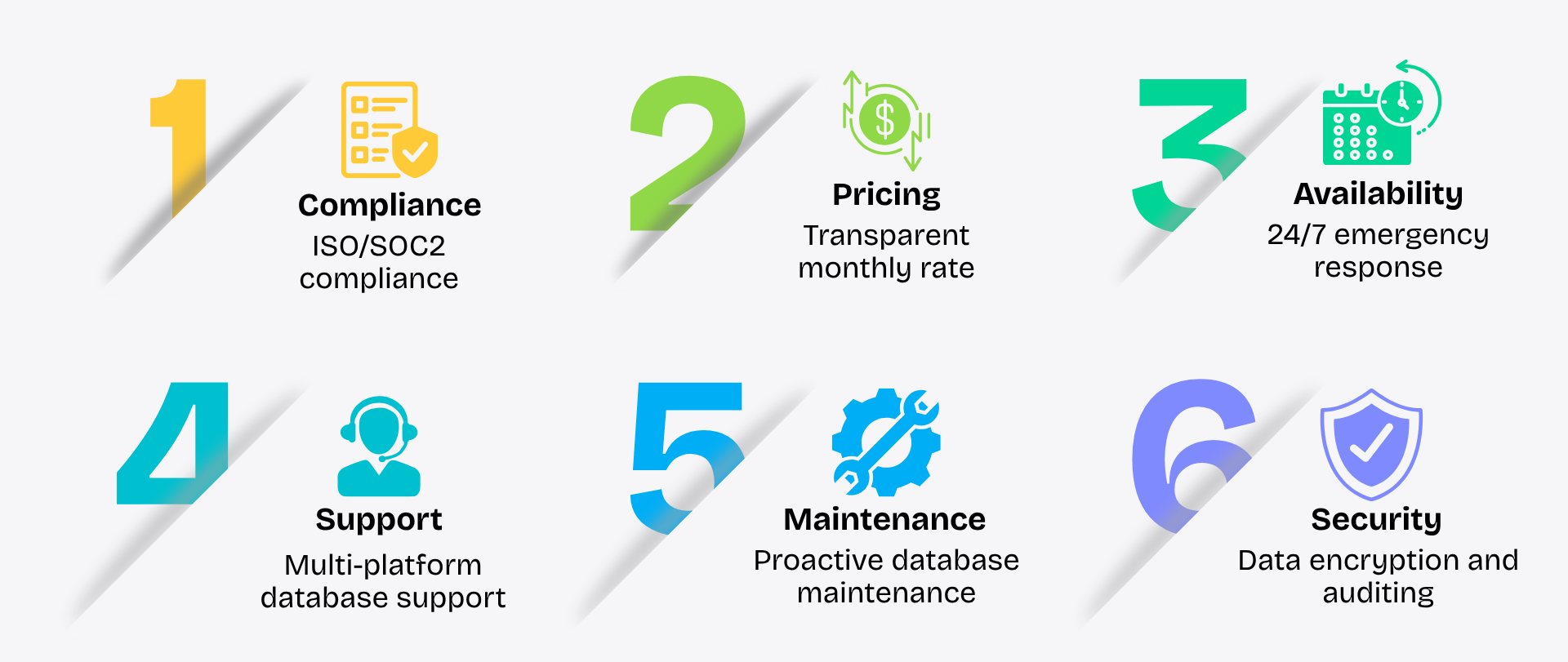
Before choosing a remote DBA service, compare more than pricing. The right DBA team should fit your database environment, support requirements, security expectations, and long-term operational needs.
- Database Expertise: Check whether the DBA team has hands-on experience with your database platforms, versions, cloud environment, and workload type.
- 24/7 Monitoring and Support: Confirm whether continuous monitoring and after-hours DBA support are available, especially if your applications require high availability.
- Service Scope: Review exactly what is included, such as database monitoring, maintenance, performance tuning, troubleshooting, patching, backup, recovery, and upgrades.
- Performance Management: Look for a team that can identify root causes behind slow queries, high resource usage, locking issues, and other database performance problems.
- Security and Access Controls: Evaluate how the team manages privileged database access, authentication, credentials, permissions, auditing, and secure remote connections.
- Backup and Disaster Recovery: Check backup frequency, retention, recovery procedures, RPO, RTO, and whether restoration tests are performed regularly.
- SLA and Response Times: Compare guaranteed response times, incident severity levels, escalation procedures, and support availability.
- Dedicated DBA Support: Understand whether you will have a dedicated DBA, a shared DBA team, or a combination of both. Also check how backup coverage is handled.
- Reporting and Documentation: Look for regular database health reports, incident reports, performance recommendations, and updated technical documentation.
- Pricing Transparency: Compare the complete cost, including after-hours support, emergency assistance, additional DBA hours, migrations, upgrades, and services outside the standard scope.
- Scalability: Consider whether the Remote DBA team can support database growth, new applications, migrations, cloud adoption, and changing workload requirements.
- Proactive Support: Prioritize teams that identify potential database issues before they become outages rather than only responding after something fails.
Conclusion
Choosing the right remote DBA service can improve database performance, availability, security, and day-to-day reliability. Before outsourcing, evaluate database expertise, monitoring, security, disaster recovery, SLAs, service scope, and pricing transparency. The right DBA team should align with your current infrastructure while supporting future growth. If you want to assess your database environment or decide which DBA support model fits your business, contact the Geopit advisory team. Our experts can help you evaluate your requirements and identify the right approach for reliable, scalable database administration.
FAQ
1. What is a Remote DBA?
A Remote DBA is a database administrator or DBA team that manages and supports databases remotely. Services can include database monitoring, performance tuning, maintenance, troubleshooting, backup and recovery, security, upgrades, and high-availability support.
2. What does a Remote DBA service include?
Remote DBA Services can include 24/7 database monitoring, performance optimization, backup management, database maintenance, security support, troubleshooting, patching, disaster recovery, and database upgrades. The exact services depend on the organization’s requirements and service agreement.
3. How much does a Remote DBA service cost?
The cost of Remote DBA Services depends on factors such as the database platform, number and size of databases, support hours, monitoring requirements, SLA, and service scope. Some teams use fixed monthly plans, while others offer hourly or customized support models.
4. How do I choose the right Remote DBA service?
Choose a Remote DBA service by evaluating database expertise, support availability, security practices, performance management, backup and disaster recovery, SLA response times, reporting, pricing transparency, and scalability. The DBA team should have experience with your database environment and business requirements.
5. Is Remote DBA support available 24/7?
Yes, many Remote DBA Services offer 24/7 monitoring and support, but coverage varies by service agreement. Before signing, confirm whether monitoring, incident response, on-call DBA support, and emergency troubleshooting are available around the clock.
6. Can a Remote DBA improve database performance?
Yes. A Remote DBA team can identify performance bottlenecks by analyzing slow queries, execution plans, indexes, locking, resource utilization, connections, and database configuration. The team can then recommend or implement changes to improve database performance and stability.

Prabhu Sundaram
.svg)
.svg)


.avif)