.svg)
.svg)
.svg)


.svg)


.svg)
.svg)

.svg)

Introduction
In most organizations, data lives scattered across multiple systems - transactional databases, spreadsheets, CRMs - with no single place to answer business questions reliably. A Data Warehouse solves this by centralizing, cleaning, and structuring data for analytics.
This case study walks through a complete, hands-on implementation of a Medallion Architecture (Bronze → Silver →Gold) using the publicly available Olist Brazilian E-Commerce dataset. We ingest raw data from MySQL into PostgreSQL, apply minimal cleaning in the Silver layer, and build a clean Star Schema with Fact and Dimension tables in the Gold layer - finally connecting everything to Apache Superset for BI reporting.
Dataset
We use the Olist Brazilian E-Commerce Public Dataset, freely available on Kaggle. It contains real anonymized e-commerce transactions from 2016 to 2018 across Brazil.
Architecture Overview
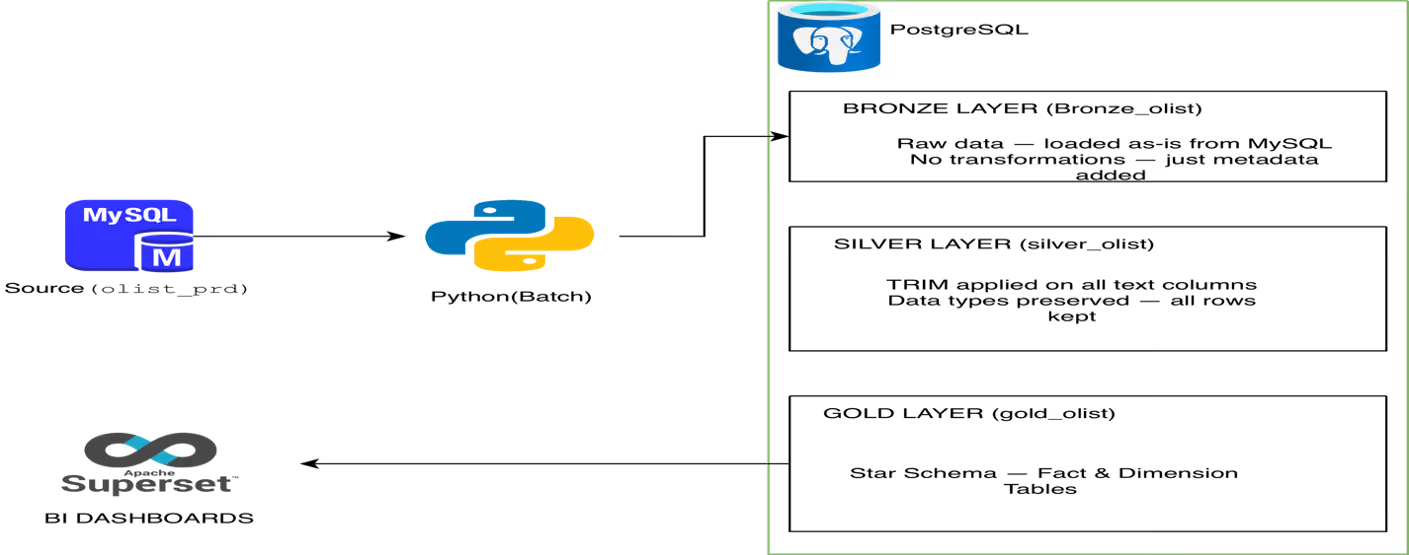
All three layers - Bronze, Silver, and Gold - live inside a single PostgreSQL instance (olist_DWH) as separate schemas. Apache Superset connects to both PostgreSQL and MySQL for comparison dashboards.
Step 1 - Load Data into MySQL
Download the 9 CSV files from Kaggle and import into MySQL. Create the database first:
CREATE DATABASE olist_prd;
USE olist_prd;
Create all 9 tables and import CSVs using MySQL Workbench's Table Data Import Wizard. For the large geolocation table(~1M rows), use LOAD DATA INFILE for better performance. After import, verify row counts match expected values.
Step 2 - Bronze Layer: Python Ingestion (MySQL →PostgreSQL)
We use Python to extract all 9 tables from MySQL and load them into the bronze_olist schema in PostgreSQL - exactly as-is, with no transformations. Two metadata columns are added: ingested_at andsource_system.
import mysql.connector
import pandas as pd
from sqlalchemy import create_engine

MYSQL_CONFIG = {
    "host":     "localhost",
    "port":     3306,
    "user":     "root",
    "password": "your_password",
    "database": "olist_prd"
}

PG_CONN = "postgresql+psycopg2://postgres:your_password@localhost:5432/olist_DWH"

TABLES = [
    "category_translation", "customers", "geolocation",
    "order_items", "order_payments", "order_reviews",
    "orders", "products", "sellers"
]

mysql_conn = mysql.connector.connect(**MYSQL_CONFIG)
pg_engine  = create_engine(PG_CONN)

for table in TABLES:
    print(f"Ingesting: {table}")
    df = pd.read_sql(f"SELECT * FROM {table}", mysql_conn)
    df["ingested_at"]   = pd.Timestamp.now()
    df["source_system"] = "mysql_olist_prd"
    df.to_sql(table, pg_engine, schema='bronze_olist',
              if_exists='replace', index=False)
    print(f"  → {len(df):,} rows loaded")

mysql_conn.close()
print("Bronze ingestion complete.")
Result: All 9 tables land inbronze_olist schema with ingested_at and source_system metadata columns added.
Step 3 - Silver Layer: TRIM and Standardize
For this dataset, data quality is already good. Our Silver strategy is simple: keep all rows, apply TRIM on all text columns, no filtering, no row deletions. This ensures Superset reports have the full dataset to work with.
-- silver_olist.customers
INSERT INTO silver_olist.customers
SELECT
    TRIM(customer_id),
    TRIM(customer_unique_id),
    customer_zip_code_prefix,
    TRIM(customer_city),
    TRIM(customer_state),
    ingested_at,
    source_system
FROM bronze_olist.customers;

-- silver_olist.order_items
INSERT INTO silver_olist.order_items
SELECT
    TRIM(order_id),
    order_item_id,
    TRIM(product_id),
    TRIM(seller_id),
    TRIM(shipping_limit_date),
    price,
    freight_value,
    ingested_at,
    source_system
FROM bronze_olist.order_items;

-- Repeat for: orders, products, sellers, category_translation
Verify: Row counts in silver must exactly match bronze for all 9 tables.
Step 4 - Gold Layer: Fact & Dimension Tables
This is the heart of the implementation. We build a Star Schema with 2 Fact Table and 3 Dimension Tables,
Our complete gold layer consists of 2 Fact Tables and 5 Dimension Tables forming a comprehensive star schema for BI reporting.
dim_seller
CREATE TABLE IF NOT EXISTS gold_olist.dim_seller
(
    seller_sk              SERIAL PRIMARY KEY,
    seller_id              TEXT,
    seller_zip_code_prefix BIGINT,
    seller_city            TEXT,
    seller_state           TEXT
);

INSERT INTO gold_olist.dim_seller
    (seller_id, seller_zip_code_prefix, seller_city, seller_state)
SELECT seller_id, seller_zip_code_prefix, seller_city, seller_state
FROM silver_olist.sellers;

-- Result: 3,095 rows
dim_payment_type
CREATE TABLE IF NOT EXISTS gold_olist.dim_payment_type
(
    payment_type_sk  SERIAL PRIMARY KEY,
    payment_type     TEXT
);

INSERT INTO gold_olist.dim_payment_type (payment_type)
SELECT DISTINCT payment_type
FROM silver_olist.order_payments
ORDER BY payment_type;

-- Result: 4 rows (boleto, credit_card, debit_card, voucher)
fact_order_items - Primary Fact Table
Grain: One row = one item within one order. Contains all revenue measures and links to dim_date, dim_customer,dim_product and dim_seller.
CREATE TABLE IF NOT EXISTS gold_olist.fact_order_items
(
    order_item_sk        SERIAL PRIMARY KEY,
    order_id             TEXT,
    order_item_id        BIGINT,
    date_sk              INT,    -- FK -> dim_date
    customer_sk          INT,    -- FK -> dim_customer
    product_sk           INT,    -- FK -> dim_product
    seller_sk            INT,    -- FK -> dim_seller
    order_status         TEXT,
    delivery_status      TEXT,
    price                DOUBLE PRECISION,
    freight_value        DOUBLE PRECISION,
    total_item_value     DOUBLE PRECISION,
    review_score         BIGINT,
    actual_delivery_days INT
);

INSERT INTO gold_olist.fact_order_items
    (order_id, order_item_id, date_sk, customer_sk, product_sk,
     seller_sk, order_status, delivery_status, price, freight_value,
     total_item_value, review_score, actual_delivery_days)
SELECT
    oi.order_id,
    oi.order_item_id,
    TO_CHAR(TO_TIMESTAMP(o.order_purchase_timestamp,
        'YYYY-MM-DD HH24:MI:SS'), 'YYYYMMDD')::INT      AS date_sk,
    dc.customer_sk,
    dp.product_sk,
    ds.seller_sk,
    o.order_status,
    CASE
        WHEN o.order_status IN ('cancelled','unavailable') THEN 'CANCELLED'
        WHEN o.order_delivered_customer_date IS NULL        THEN 'PENDING'
        WHEN o.order_delivered_customer_date
           > o.order_estimated_delivery_date               THEN 'LATE'
        ELSE 'ON_TIME'
    END                                                    AS delivery_status,
    oi.price,
    oi.freight_value,
    ROUND((oi.price + oi.freight_value)::NUMERIC, 2)       AS total_item_value,
    orv.review_score,
    CASE WHEN o.order_delivered_customer_date IS NOT NULL
    THEN DATE_PART('day',
         TO_TIMESTAMP(o.order_delivered_customer_date,
             'YYYY-MM-DD HH24:MI:SS') -
         TO_TIMESTAMP(o.order_purchase_timestamp,
             'YYYY-MM-DD HH24:MI:SS'))::INT
    ELSE NULL END                                          AS actual_delivery_days
FROM silver_olist.order_items oi
JOIN silver_olist.orders o
    ON oi.order_id = o.order_id
JOIN silver_olist.customers c
    ON o.customer_id = c.customer_id
JOIN gold_olist.dim_customer dc
    ON c.customer_id = dc.customer_id
JOIN gold_olist.dim_product dp
    ON oi.product_id = dp.product_id
JOIN gold_olist.dim_seller ds
    ON oi.seller_id = ds.seller_id
LEFT JOIN silver_olist.order_reviews orv
    ON oi.order_id = orv.order_id;

-- Result: ~112,650 rows
fact_order_payments - Secondary Fact Table
Grain: One row = one payment record perorder. Captures payment method, installments and payment value. Links todim_date, dim_customer and dim_payment_type.
CREATE TABLE IF NOT EXISTS gold_olist.fact_order_payments
(
    payment_sk            SERIAL PRIMARY KEY,
    order_id              TEXT,
    date_sk               INT,    -- FK -> dim_date
    customer_sk           INT,    -- FK -> dim_customer
    payment_type_sk       INT,    -- FK -> dim_payment_type
    payment_sequential    BIGINT,
    payment_installments  BIGINT,
    payment_value         DOUBLE PRECISION
);

INSERT INTO gold_olist.fact_order_payments
    (order_id, date_sk, customer_sk, payment_type_sk,
     payment_sequential, payment_installments, payment_value)
SELECT
    op.order_id,
    TO_CHAR(TO_TIMESTAMP(o.order_purchase_timestamp,
        'YYYY-MM-DD HH24:MI:SS'), 'YYYYMMDD')::INT     AS date_sk,
    dc.customer_sk,
    dpt.payment_type_sk,
    op.payment_sequential,
    op.payment_installments,
    op.payment_value
FROM silver_olist.order_payments op
JOIN silver_olist.orders o
    ON op.order_id = o.order_id
JOIN silver_olist.customers c
    ON o.customer_id = c.customer_id
JOIN gold_olist.dim_customer dc
    ON c.customer_id = dc.customer_id
JOIN gold_olist.dim_payment_type dpt
    ON op.payment_type = dpt.payment_type;

-- Result: ~103,886 rows
Final Row Count Verification
SELECT 'dim_date'            AS table_name, COUNT(*) FROM gold_olist.dim_date
UNION ALL
SELECT 'dim_customer',        COUNT(*) FROM gold_olist.dim_customer
UNION ALL
SELECT 'dim_product',         COUNT(*) FROM gold_olist.dim_product
UNION ALL
SELECT 'dim_seller',          COUNT(*) FROM gold_olist.dim_seller
UNION ALL
SELECT 'dim_payment_type',    COUNT(*) FROM gold_olist.dim_payment_type
UNION ALL
SELECT 'fact_order_items',    COUNT(*) FROM gold_olist.fact_order_items
UNION ALL
SELECT 'fact_order_payments', COUNT(*) FROM gold_olist.fact_order_payments;
Step 6 - BI Reporting with Apache Superset
Apache Superset runs via Docker and connects to both databases for side-by-side comparison dashboards.
Charts in each dashboard:
- Total Revenue - Big Number with Trendline
- Monthly Revenue Trend - Line Chart
- Revenue by Product Category - Bar Chart
- Top 10 Selling Categories - Horizontal Bar
- Orders by State - Country Map (Brazil)
- Avg Delivery Days by State - Table withHeatmap
Key insight: Both dashboards showidentical numbers - same data, same results. But the Gold Layer is faster, usesclean English category names, and pre-computes delivery status.
Key Takeaways
- Bronze layer: Bronze layer preserves raw data exactly as it arrives from the source - no transformations, just metadata
- Silver layer: Silver layer applies lightweight standardization (TRIM) without removing any rows - full dataset stays intact for reporting
- Gold layer: Gold layer builds the Star Schema - a fact table surrounded by dimension tables - optimized for analytical queries
- Surrogate keys: Surrogate keys (SERIAL integers) decouple the warehouse from source system IDs and enable slowly changing dimensions
- dim_date: dim_dateis always generated, never sourced - it gives full calendar control for time-based analysis
- Superset: Apache Superset connects directly to the Gold schema and delivers fast, interactive BI dashboard
Repository
All scripts - Python ingestion, Silver SQL, Gold DDL, and INSERT queries - are available in the GitHub repository: https://github.com/aravindrajamani/Mastering-Fact-Dimension-Tables-with-Medallion-Architecture-for-BI-Reports

Aravind Rajamani
.svg)
.svg)