New
Back
Database Management

Reliable database management for modern, high-performance systems.

Back
Data Modernisation

Reliable database management for modern, high-performance systems.

Back
Data Engineering

Reliable database management for modern, high-performance systems.

Back
Analytics & Intelligence

Reliable database management for modern, high-performance systems.

Back
Data Strategy Consulting

Reliable database management for modern, high-performance systems.

How to fix query optimizer for better performance

Thirunavukkarasu RM
Published on
April 1, 2021

You can find this option from SQL server 2016.

Use trace flag 4199 on earlier versions of SQL server to utilize the similar feature.

When you apply any hot fixes, cumulative update or service pack, SQL server optimizer would utilise the changes immediately, in case if you enabled the query optimizer fixes. The new patches can result in performance improvement or degrade.
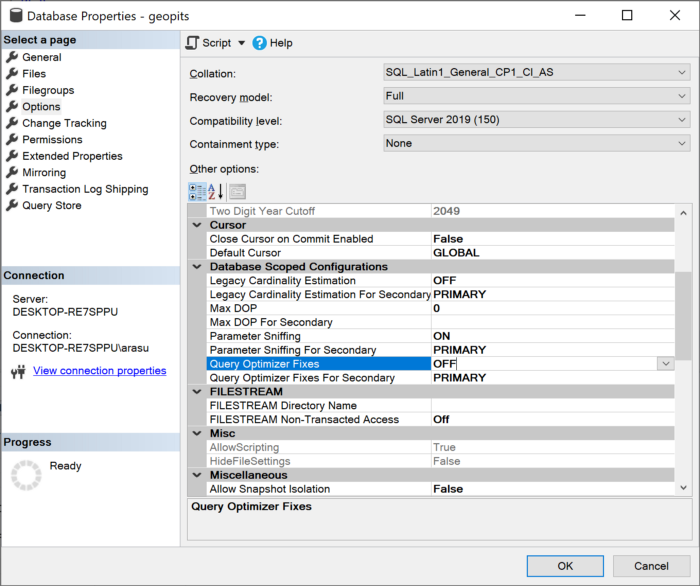
Choose ON or OFF?

It depends on environment. For example if you have UAT environment then apply all the new patches and make sure environment is stable, then proceed to apply the patch on production. In this case you can enable QQF.

If you don't have testing environment then better OFF the QQF, it may impact (Positive or negative) the optimizer performance because of new update.

In general if you need to maintain the baseline performance better keep the QQF off, if you feel all new new updates may yield better performance then enable QQF.

Thirunavukkarasu RM

Thirunavukkarasu Ramasamy has 17+ years of experience in database management and the Microsoft Data Platform, with expertise in SQL Server, database architecture, and data solutions. As the Senior Solution Architect of Geopits, he focuses on building scalable data platforms, modernizing database environments, and delivering reliable enterprise data solutions.

Our Latest Blogs

From monitoring to modernization, GeoPITS provides expert database management services that enhance performance, strengthen security, and reduce operational costs.

Ready to Transform Your Data?

Geopits works alongside your team as a strategic partner, starting with stabilizing your current databases, then modernizing your data infrastructure, and ultimately helping you unlock the full potential of AI.

170

Happy Clients so far

2100+

Databases Managed

142+

Successful Migrations

Thank you! Your submission has been received!
Oops! Something went wrong while submitting the form.