.svg)
.svg)
.svg)


.svg)


.svg)
.svg)

.svg)


SQL Server 2017 introduces new Dynamic Management Views that will help the performance of SQL Server instances.
In this new Dynamic Management Views now, I am going explain about sys.dm_db_log_stats DMV.
This is very useful high transaction system when log backup has done on regular basis.
sys.dm_db_log_stats:
New Dynamic Management introduced in 2017 is sys.dm_db_log_stats. This is mainly replacement of the DBCC LOGINFO and DBCC SQLPERF commands.
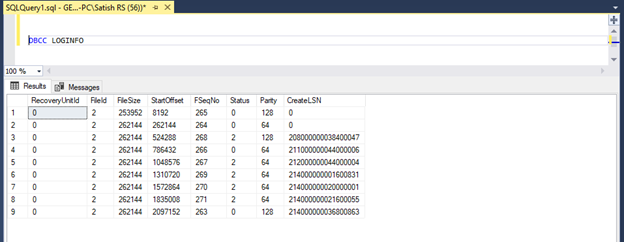
DBCC LOGINFO command provides the important information about structure of the log transaction as shown below figure.
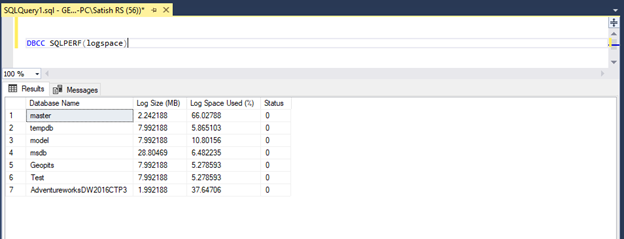
DBCC SQLPERF command provides the transaction log space usage statistics for all databases as shown below figure.
Now let us discuss about the new DMV (sys.dm_db_log_stats).
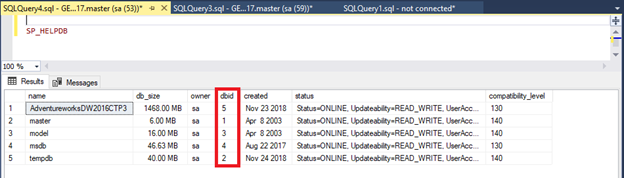
For this DMV, We must supply a parameter with Database ID. For checking Database ID, you can simply run the command SP_HELPDB and check the Database ID.
Select * from sys.dm_db_log_stats (5)
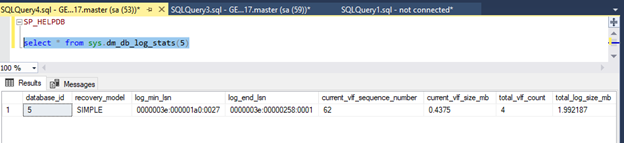
Now you can see this will give much more Information compared to previous DBCC command like
Database ID
Recovery model
Log minimum LSN
Log end LSN
Current VLF sequence number
Current VLF size in MB
Total VLF count,
Total log size
Active log size in MB
Log backup time
Log backup LSN
Log since last backup in MB
Log recovery size in MB
Log checkpoint in MB
Recovery VLF count
So, if you see this will give much more information in terms of what going in log that can troubleshoot log issues.
If you don't know Database ID, then there is another better way of checking is with Database Name.
Select * from sys.dm_db_log_stats('Database Name')
Here I am executing the sys.dm_db_log_stats command with AdventureworksDW2016CTP3 database as shown below snapshot.
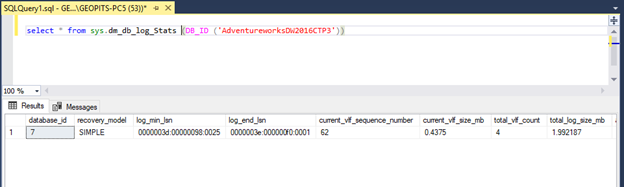
This DMF has output column log since last backup, which represents how much log data has been generated since last transaction log backup.
We can use this information effectively to manage the SQL Server transaction log backups.
This is very useful new DMV introduced SQL Server 2017, which is mainly replacement of DBCC loginfo and DBCC log sqlperf.
Further reading:
.svg)

.svg)