.svg)
.svg)
.svg)


.svg)


.svg)
.svg)

.svg)

Key Takeaways:
- Database System Red Flags: 10 critical warning signs, including frequent downtime, slow queries, and configuration issues requiring managed database services.
- Reduce Internal Engineering Strain: Offloading routine database maintenance and tuning stops developer burnout, letting your core team focus on building product features.
- Eliminate Talent & Coverage Gaps: Relying on a single in-house DBA creates silent risks, while managed teams offer round-the-clock expertise across complex environments.
Ask any CEO what keeps their business running, and most won't mention the database. Yet it's there behind every sales report, every customer order, every number on the finance dashboard. Nobody notices it when things are fine. The moment it isn't, revenue drops, customers get frustrated, and the team ends up putting out fires instead of doing actual work.
That's the gap Managed Database Services are built to close. Instead of waiting for something to break, businesses get 24/7 database support and continuous database monitoring that catches problems early, keeps systems running fast, and protects data.
This guide explains why companies eventually outgrow their current database setup, 10 signs that it's time to bring in outside help, and how a managed team can turn that risk into a more manageable situation.
Why Enterprises Outgrow Traditional Database Management
Enterprises outgrow traditional on-premises database management because legacy systems struggle to handle massive data volume, diverse unstructured formats, and real-time cloud scaling demands. This mismatch results in rigid silos, high hardware costs, and slow performance that block modern digital transformation.
Core Limitations of Legacy Systems
- Rigid Scaling: Scaling up physical servers hits hardware limits, whereas modern workloads require elastic scale-out architectures.
- Data Diversity: Traditional relational setups handle structured rows poorly when forced to process logs, IoT streams, or vector data for AI.
- Infrastructure Overhead: Maintaining on-premises hardware requires intensive manual provisioning and cross-team engineering
Drivers of Modern Migration
- Agility and Speed: Distributed cloud platforms and managed services reduce deployment times from weeks to minutes.
- Ecosystem Integration: Modern enterprises require unified access across multiple specialized data engines, including NoSQL and vector stores.
- Cost Efficiency: Dynamic resource allocation prevents over-provisioning expensive static hardware.
Why In-House DBAs Aren't Always Enough: The Hidden Cost
Hiring a database administrator feels like solving the problem. On paper, the role is covered. In practice, the real cost of an in-house setup shows up in places most budgets never account for
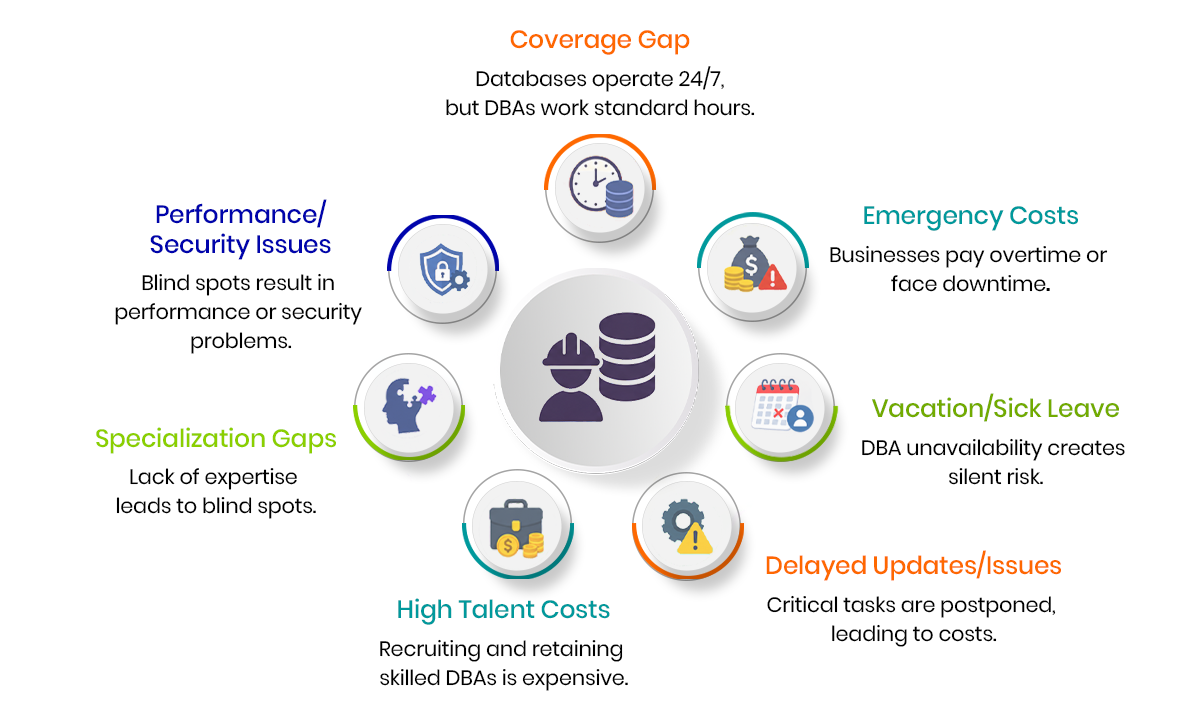
The coverage gap costs more than it seems: A single DBA works standard hours, but databases operate every hour of the day. When an issue hits at 2 AM, the business either waits until morning or pays emergency rates to get someone online. Either way, that gap has a price, whether it's downtime, lost sales, or a rushed overtime bill.
Vacation and sick leave create silent risk: The moment your one database expert is unavailable, so is your safety net. Most companies don't calculate this as a cost, yet it's a real one. A critical update delayed by a week because the DBA was out, or a performance issue that sits unresolved for days, adds up quietly over a year.
Hiring and retaining top talent is expensive: Experienced database administrators, especially ones skilled across cloud, hybrid, and multi-database environments, command high salaries. Add recruiting fees, onboarding time, and the learning curve for new hires, and the true cost of one skilled DBA is often higher than businesses initially budget for.
Specialization gaps lead to expensive blind spots: One person can rarely be an expert in every database engine, cloud platform, and compliance requirement a growing business touches. When a gap in expertise leads to a slow migration, a missed optimization, or a compliance oversight, the cost isn't always visible right away, but it shows up eventually in performance, security, or audit results.
10 Warning Signs You Need Managed Database Services
You need Managed Database Services when internal teams spend more time fixing outages and slow queries than building core product features. Key warning signs include frequent system downtime, lagging application performance, and unmonitored security risks.
Performance and Reliability Issues
1. Frequent Downtime
Once systems crash more than occasionally, that's not bad luck anymore; it's a red flag. Customers don't wait around when a checkout page fails; they leave and try somewhere else. Every minute adds up in lost trust and lost revenue. When outages turn into a pattern instead of a rare event, it's a clear sign the infrastructure needs professional oversight, the kind Managed Database Services are built to provide.
2. Slow Queries
Nobody really complains about a database. They complain that the app feels slow, or a report that used to load in seconds now takes forever. That's usually a query problem hiding underneath, often a missing index, poor query design, or a database that's simply outgrown its architecture. If this keeps coming up from your team or your customers, treat it as a red flag worth investigating, and that's exactly what good database monitoring is meant to catch.
3. Resource Limits
Running out of memory or CPU power on a regular basis means the database has outgrown its environment. This tends to build slowly, so by the time someone notices, the system is already straining under load it was never optimized to handle.
4. Bad Configurations
Plenty of businesses are still running on default settings, not by choice, but because nobody had the time or expertise to tune them properly. It's a quiet red flag. Default configurations are rarely built for a specific workload, and left alone, they become one of the biggest hidden causes of poor performance, exactly what dependable database support is meant to prevent.
Team and Maintenance Pressures
5. Developer burnout
When your engineers spend more time fixing database bugs than writing actual code, something is broken in the system, not just the database. This is a red flag for both your database health and your team's morale. Skilled developers pulled into constant firefighting eventually burn out or leave.
6. No expert staff
If nobody on your team has formal database administration training, you're operating without a safety net. This is one of the more dangerous red flags because problems can exist for months without anyone recognizing them until it's too late.
7. Missed updates
Security patches and software upgrades that keep getting pushed back are a serious red flag. Every delayed patch is a known vulnerability sitting exposed, and attackers actively look for exactly this kind of gap.
8. Manual chores
If routine work like index tuning, query optimization, or log reviews is eating up your entire day, that's a red flag that your processes aren't scalable. Manual maintenance doesn't grow with your business; it just adds more hours to somebody's workload.
Backup and Growth Risks
9. Backup failures
Discovering that a backup takes too long to restore, or worse, fails completely when you actually need it, is one of the most critical red flags on this list. A backup that doesn't work when you need it isn't a backup at all.
10. Scaling stress
When growing data volumes start making your current setup crash or crawl, it's a red flag that your infrastructure wasn't built with growth in mind. Scaling issues rarely announce themselves early. They tend to show up right when your business is busiest, which is the worst possible time.
Benefits of Managed Database Services for Business Growth
Managed database services allow businesses to delegate routine administrative tasks, server maintenance, and security patching to third-party providers. This approach reduces operating costs, improves system uptime, and lets internal teams focus on product development and core business growth.
Continuous Database Monitoring
Real-time tracking flags slow queries, resource spikes, and unusual activity as they happen, often before customers ever notice. This is the difference between finding out about a problem from a monitoring alert versus finding out from an angry customer email.
24/7 Database Support: Coverage doesn't stop at 5 PM or during someone's vacation. Round-the-clock database support closes exactly the gaps that limited in-house coverage leaves open, so a weekend outage gets handled in real time, not Monday morning.
Proactive Database Maintenance: Index tuning, configuration reviews, and query optimization happen on a regular schedule instead of during a crisis. This steady rhythm keeps performance strong and prevents small issues from turning into major ones.
Backup, Recovery & Disaster Preparedness: Backups get tested regularly, not just created and forgotten. That means when data recovery is actually needed, it works the first time, not after hours of troubleshooting.
Security & Compliance Management: Patches get applied on schedule, vulnerabilities get closed quickly, and regulated industries stay aligned with the compliance standards they're required to meet.
Faster Time-to-Market: Speeds up application deployment so new features reach customers much faster.
Together, these five pillars are what Managed Database Services actually deliver, turning database monitoring and database support from occasional tasks into a consistent, built-in part of how a business operates.
How Managed Database Services Actually Work: A Real-World Case Study on Downtime Recovery
A retail enterprise running a roughly 1 TB Microsoft SQL Server database needed migration to PostgreSQL on AWS as part of a database modernization initiative, with a production environment supporting continuous transactional workloads across 250+ tables, 700+ indexes, and millions of records.
Challenge: Geopits had to migrate this large dataset while preserving full data integrity. Production downtime needed to stay minimal so business operations were not disrupted. The team also had to work through compatibility issues between SQL Server and PostgreSQL, including differences in data types, timestamp handling, character encoding, and case sensitivity. All of this had to happen within a planned maintenance window, followed by resolving any performance issues after cutover.
Solution: To reduce cutover risk, the team ran UAT and mock migrations. They built a custom Python migration framework leveraging parallel data extraction and loading. High-speed imports used PostgreSQL COPY, with pgloader as a fallback for complex datasets. Index and constraint creation was deferred for faster bulk loading. Production testing prompted a shift from CDC sync to a full-load approach. Post-cutover, a temporary reverse sync pipeline enabled validation and provided a rollback option.
Result: The migration was completed successfully within the planned maintenance window. Zero data loss was confirmed through row count comparisons, schema verification, and full application testing. The result was a stable, fully functioning PostgreSQL production environment.
Read the full Geopits client success story about how a retail enterprise migrated its ~1 TB database from SQL Server to PostgreSQL with zero data loss.
Conclusion
Every warning sign covered in this guide points to the same lesson: acting early costs far less than recovering from a major outage. Managed Database Services combine ongoing database monitoring and reliable database support into one system, helping businesses reduce downtime, improve performance, and avoid the hidden costs that come with managing databases in-house alone.
As data volumes grow and infrastructure gets more complex, the businesses that stay ahead are the ones treating database monitoring and database support as continuous practices, not one-time fixes.
If your team recognizes two or more of the warning signs covered here, it's worth a closer look at your current setup.
Talk to Geopits database modernization experts for a straightforward assessment of your infrastructure; no sales pitch, just a clear picture of where your database stands and what Managed Database Services could improve.
FAQ
1. Are Managed Database Services more cost-effective than hiring an in-house DBA?
Yes, in most cases. Managed Database Services provide access to a full team of specialists, monitoring tools, and round-the-clock support for a predictable monthly cost, often lower than the total cost of one full-time hire.
2. When should a company hire a managed DBA team?
The best time is proactively, once any of the ten warning signs appear. Acting early prevents the higher costs that come with outages, data loss, or major performance failures.
3. How do Managed Database Services improve database performance?
They combine continuous monitoring with scheduled maintenance, catching performance issues early and resolving them through expert tuning and optimization.
4. What is the difference between database monitoring and database support?
Database monitoring tracks system health around the clock and flags issues as they arise. Database support provides the expert team that resolves those issues and handles emergencies. Together, they form a complete database management strategy.

Naresh Kumar S
.svg)
.svg)