.svg)
.svg)
.svg)


.svg)


.svg)
.svg)

.svg)

Data migration works without data loss when you audit the source, choose a phased approach, validate every batch with checksums and row counts, and keep a tested rollback plan ready. Cutover happens only after reconciliation proves the source and target match.
Key Takeaways
- Data migration is the process of selecting, preparing, extracting, transforming, and permanently moving data from one computer storage system, database, or environment to another.
- Most migration failures start in planning, so the audit and ownership decisions matter more than the tooling.
- Phased and trickle migrations carry less risk than a single big-bang cutover for anything measured in terabytes.
- Data loss is prevented by checking every batch (row counts, checksums, sample comparisons)
- A rollback plan you have rehearsed is worth more than a perfect plan you have never tested.
Moving a few gigabytes is a file copy. Moving 50, 200, or 500 terabytes is an engineering project with a budget, a timeline, and real business risk. Orders, patient records, financial ledgers, and customer histories all sit inside those tables, and a single silent error can spread through reports for months before anyone notices.
This guide from Geopits explains how to approach data migration in a way that protects data integrity. It covers strategy, planning, tools, validation, security, and rollback; in plain steps, you can apply it to your environment.
What Is Data migration?
Data migration is the process of moving large volumes of data between systems, such as from an on-premises data center to the cloud, from one database engine to another, or from a legacy platform to a modern one.
Common triggers include:
- Moving to cloud platforms such as AWS, Azure, or Google Cloud
- Replacing a legacy ERP or CRM
- Consolidating systems after a merger
- Retiring old hardware or a data center lease
- Shifting to a data lake or modern warehouse for analytics
Why Do Data Migration Projects Fail?
Data migration projects fail because teams underestimate data quality problems, skip early testing, and leave ownership unclear. The technology is rarely the root cause.
The numbers are sobering. A separate Gartner view holds that 50% of data migration initiatives will exceed their budget and timeline by 25% to 100% or more because of flawed strategy and execution.
On the cloud side, McKinsey's 2021 survey of 450 CIOs found that 75% of cloud migrations ran over budget, and only 15% of organizations finished on time and within original estimates.
Poor data quality adds another cost. Gartner research puts the average yearly cost of poor data quality at $12.9 million per organization. Moving bad data into a new system does not fix it; it only relocates the problem.
What Are the 5 Common Causes of Data Migration Failure?
1. No Full Inventory of What Exists in the Source: Many teams begin a migration without a complete list of the databases, tables, file shares, and integrations they own. Old reporting databases, shadow spreadsheets, and forgotten scheduled jobs often turn up halfway through the project. Each surprise adds cost and pushes the timeline. A full inventory, with size, owner, and usage for every dataset, gives the team an accurate scope before the first byte moves.
2. Dirty, Duplicated, or Outdated Records Carried Over: Source systems collect errors over the years: repeated customer profiles, mismatched date formats, and records nobody has touched in a decade. When these move to the new platform, they slow queries, distort reports, and inflate storage bills. Cleaning at the source costs far less than repairing the same problems inside the target, so profiling and cleanup belong before the bulk transfer.
3. Schema Differences Found Late: Source and target systems rarely match. Data types, field lengths, character encodings, and constraints can all differ. A text field that fits in the old database may be cut short in the new one, and a date stored in one format may fail to load in another. When these gaps appear during the final weeks, fixes force rework across pipelines and tests. Comparing both schemas early and documenting every transformation rule keeps these issues small.
4. Testing Squeezed Into the Last Week: Testing is often the first task to lose time when a schedule slips. A rushed test on a small sample misses the faults that only appear at full volume, such as timeouts, memory limits, and locked tables. Full-scale rehearsals with production-sized data, planned from day one, expose these problems while there is still room to correct them.
5. Nobody Clearly Owns the Final Sign-Off: When ownership is spread across IT, security, and business teams with no single decision-maker, approvals stall and small disputes grow. A 2026 ISG survey of over 200 senior decision-makers, reported by Kovair, pointed to fragmented ownership and unclear accountability as the primary driver of migration delays. Naming one accountable person per dataset, with a clear approval deadline, keeps the project moving.
What Are the Main Data Migration Strategies?
There are three core strategies: big bang, phased, and trickle. The right choice depends on data size, tolerance for downtime, and how tightly the source system is tied to daily operations.
How Do You Create a Data Migration Plan for Terabytes of Data?
Start with discovery, then define scope, owners, success criteria, and a schedule with buffer time. Planning should take a real share of the total project, often a quarter or more.
Follow these steps in order:
1. Inventory the source: List every database, table, file share, and integration. Record size, growth rate, owner, and how often each is used.
2. Classify the data: Separate what must move, what can be archived, and what can be deleted. Every terabyte you skip is a terabyte you do not have to validate.
3. Map the target: Compare source and target schemas, data types, character encodings, and constraints. Document every transformation rule.
4. Set measurable goals: Examples: zero unexplained record differences, less than 30 minutes of cutover downtime, and query performance equal to or better than the source.
5. Assign owners: Name one accountable person to approve each dataset in your data migration plan. Clear ownership speeds up decisions on data mapping, validation results, and final cutover sign-off. Without it, approvals stall, small disputes grow, and governance gaps cause more delays than technical faults. Add a data migration governance step to your plan: list each dataset, its owner, and an approval deadline.
6. Build the timeline: Include a dry run, a full rehearsal, and at least one buffer week. Add the network transfer math
How Should You Clean and Prepare Data Before Migration?
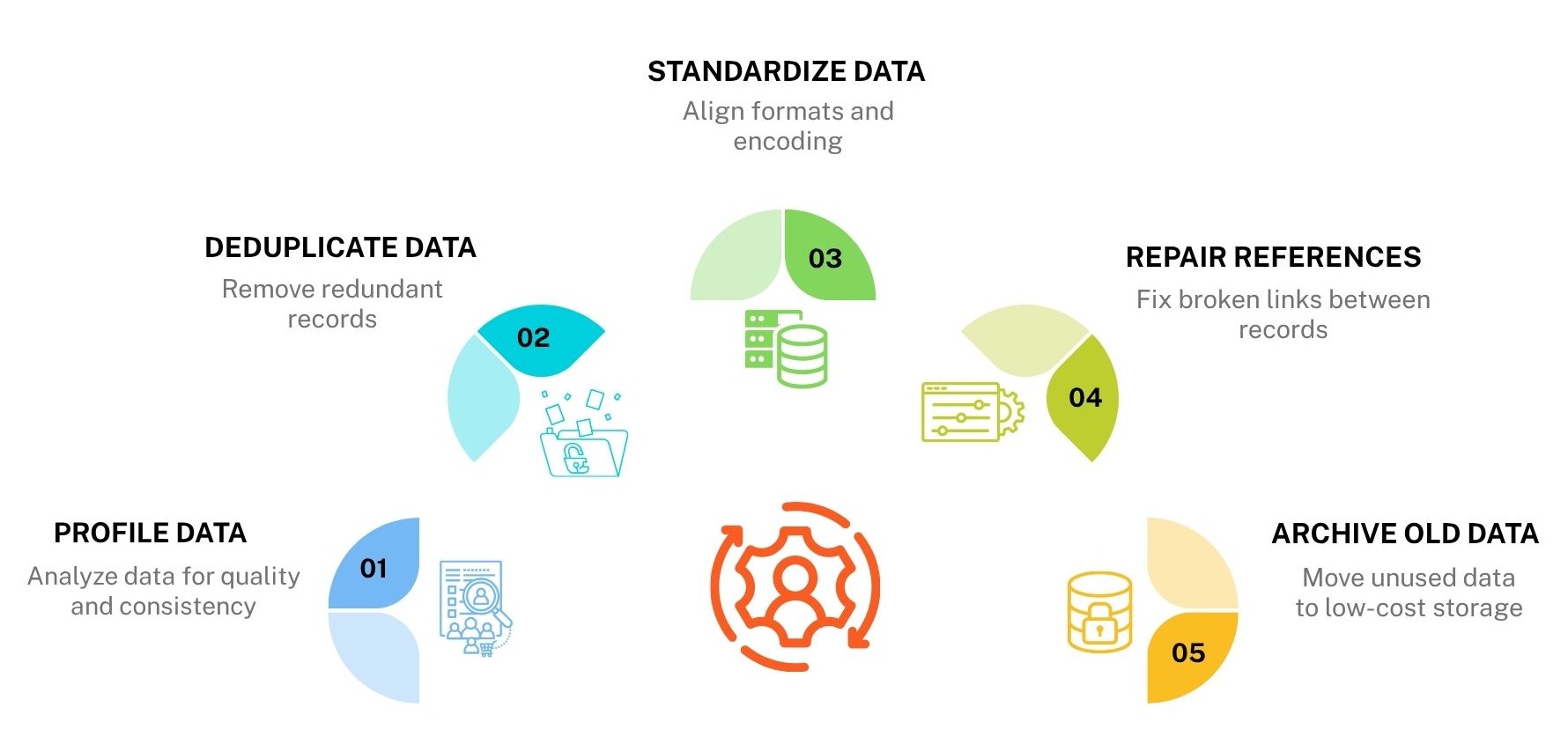
Profile the data first, then remove duplicates, fix formats, and resolve broken references before any bulk transfer starts. Cleaning at the source is cheaper than fixing errors in the target.
A practical preparation routine:
- Profile: Run counts, null checks, and range checks on every key column.
- Deduplicate: Merge or remove repeated customer, product, and vendor records.
- Standardize: Align date formats, currency codes, and text encoding (UTF-8 is the safest target).
- Repair references: Find orphaned rows where a child record points to a parent that no longer exists.
- Archive the old: Move cold data that no one has touched in years to low-cost storage instead of the new production system.
Which Data Migration Tools and Methods Handle Terabytes?
Data migration tools fall into four groups: online transfer services, offline appliances, database replication tools, and ETL/ELT pipelines. Most terabyte-scale projects combine two or more.
Online Data Transfer Services
Services such as AWS DataSync, Azure Data Box Gateway, and Google Storage Transfer Service move files and objects over the network. They include built-in integrity checks, so corrupted transfers are flagged early. These tools suit file stores and object data where bandwidth is enough to finish inside your migration window.
Offline Transfer Appliances
Physical devices such as AWS Snowball and Azure Data Box carry bulk data by shipping. This method fits tens to hundreds of terabytes when network speed is limited. Load the device, ship it to the cloud provider, and use replication afterward to sync the remaining changes.
Database Replication and CDC Tools
Tools such as AWS DMS, Debezium, and Oracle GoldenGate copy a baseline first, then stream every insert, update, and delete using change data capture (CDC). Source and target stay aligned while users continue working. This is the standard choice for zero-downtime migration of live databases.
ETL/ELT Platforms
Platforms such as Apache Spark, Airflow, dbt, and Fivetran extract data, reshape it, and load it into a new structure. They handle schema changes, data cleansing, and transformation rules at scale. Use them for data warehouse and data lake migrations where the target format differs from the source.
How Does Geopits Approach Near-Zero Downtime Migration?
Zero downtime migration relies on an initial bulk copy, followed by continuous replication of changes and a brief, controlled cutover. Users stay on the source system until the target is proven ready.
1. Bulk Load: Copy all existing data to the target while the source system stays live. Users keep working as normal, so the business sees no interruption during the largest and slowest part of the data migration.
2. Start CDC: Turn on change data capture (CDC) to record every insert, update, and delete made after the bulk load began. This keeps new transactions from being missed and protects data integrity during the transfer.
3. Catch Up: Let replication run until the lag between source and target drops close to zero. A near-zero replication lag means both systems hold almost identical data, which makes the final switch fast and safe.
4. Validate in Parallel: Compare source and target data while replication continues, using row counts, checksums, and sample record checks. Running data validation early exposes mismatches while there is still time to fix them.
5. Freeze Writes: Pause writes on the source for a short, announced window, often just a few minutes. Reads can continue, and the freeze stops new changes from arriving while the final sync completes.
6. Drain and Switch: Let the last queued changes finish syncing, confirm that the final counts match, and point applications to the target. This cutover step is quick because the target has already been tested and kept in sync.
7. Keep the Source Read-Only: Preserve the original system in read-only mode for a defined period, often two to four weeks. It works as a fallback for your rollback plan if any issue appears after go-live.
A useful side note: During load testing before its cloud move, Forbes found high latency between its data center and the cloud, which would have caused a poor user experience; the team then changed to a phased rollout. Discoveries like these are the reason to test under realistic load before cutover, not after.
How to Prevent Data Loss During Migration?
Prevent data loss by validating at every stage: before, during, and after each transfer. Compare counts, checksums, and sampled records, and log every difference until it is explained. Use these layers of validation together:
- Row and object counts: The simplest check. Every table and file group should match between source and target.
- Checksums and hashes: Generate a hash for each file or table partition on both sides. A mismatch points to silent corruption that counts alone cannot catch.
- Aggregate comparisons: Compare sums, minimums, maximums, and averages on numeric columns. Financial totals must match to the cent.
- Sample-based record checks: Pull a random set of records, plus edge cases such as the oldest, newest, and largest, and compare them field by field.
- Referential integrity checks: Confirm that foreign keys, relationships, and constraints work in the target.
- Business validation: Ask real users to run their reports and compare results with the source. A number that looks right to the person who reads it daily is a strong signal.
What Should a Data Migration Testing Checklist Include?
A solid checklist covers data accuracy, performance, security, and failure handling. Run it during rehearsals and again during the real cutover.
Run at least one full-scale rehearsal with production-sized data. A test on a small sample hides the problems that only appear at volume, such as timeouts, memory limits, and lock contention.
How to Keep Data Secure and Compliant During Migration?
Encrypt data in transit and at rest, limit access to named people, log every action, and confirm that regulations covering the data still apply in the new location.
Key steps:
- Encryption: Use TLS for transfer and strong encryption (such as AES-256) for stored data, including data on shipped devices.
- Least-privilege access: Give migration accounts only the permissions they need, and remove them when the project ends.
- Data residency: Check where the target region stores data. Laws such as GDPR, HIPAA, and India's DPDP Act can limit where certain records may live.
- Masking: Use masked or synthetic data in test environments when real personal data is not needed.
- Audit trail: Keep a record of who moved what, when, and with which result.
What Should a Rollback Plan and Post-Migration Checklist Include?
A good rollback plan names the triggers, steps, owner, and time limit, and it is tested before cutover. After go-live, monitor closely and keep the source available until the business signs off.
How Do You Build a Rollback Plan?
- Clear triggers: Set limits for checksum mismatches, application error rates, and performance floors.
- Preserved source: Keep the original system read-only for two to four weeks.
- Reverse replication: Sync new writes back to the source so a fallback loses no fresh data.
- Decision window: Name who decides and by when, since slow decisions cause more harm than the fault.
- Communication script: Prepare staff and customer messages in advance.
What Should You Do After the Data Migration Cutover?
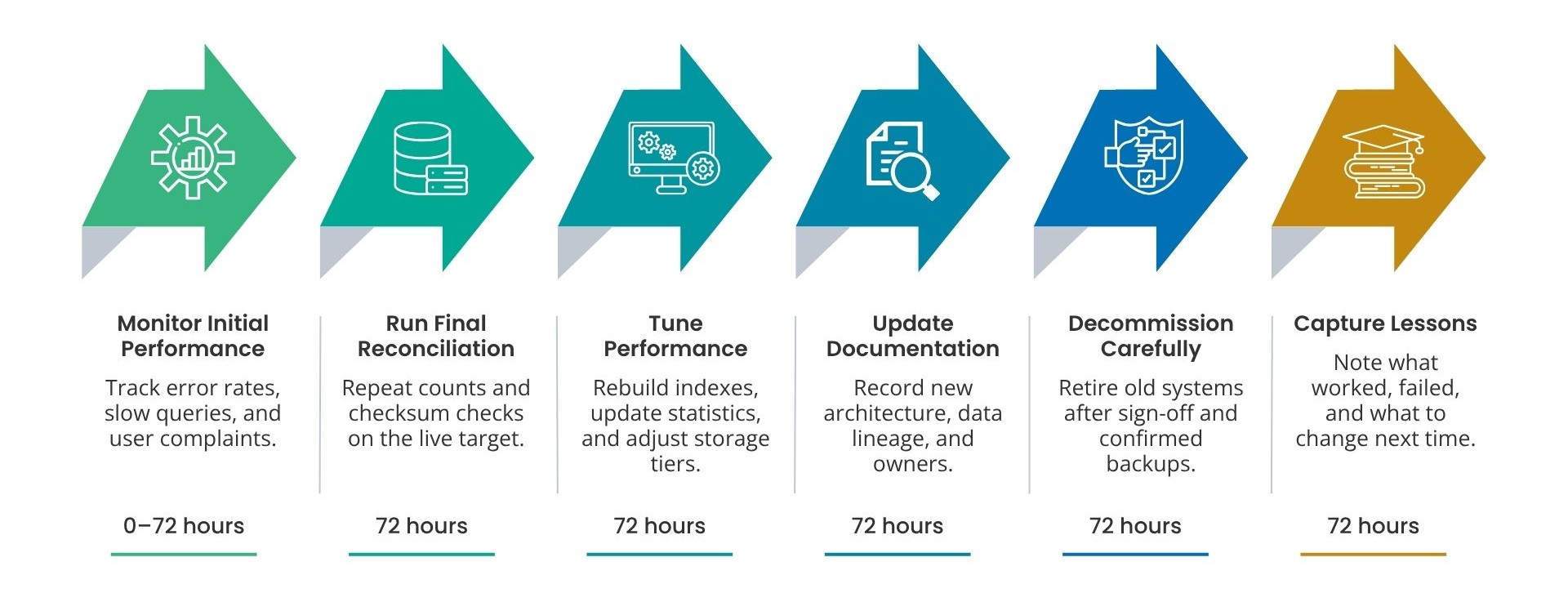
- Watch the first 72 hours: Track error rates, slow queries, and user complaints.
- Run final reconciliation: Repeat counts and checksum checks on the live target.
- Tune performance: Rebuild indexes, update statistics, and adjust storage tiers.
- Update documentation: Record the new architecture, data lineage, and owners.
- Decommission carefully: Retire the old system only after sign-off and confirmed backups.
- Capture lessons: Note what worked, what failed, and what to change next time.
How Much Does a Data Migration Cost?
Data migration cost depends on data volume, transformation effort, tooling, downtime tolerance, and team size, so no single figure fits every project. Network transfer fees, commercial replication or ETL licenses, and the cost of running old and new systems in parallel all add to the bill. Testing and data validation also require budget, and skipping them saves little because fixes after go-live are far pricier. Because industry reports show frequent overruns, add a contingency of 20% to 30% to your estimate. Get a scoped quote after a full data inventory.
How Did Geopits Migrate 3.3 TB for a Retail Bank With Minimal Downtime?
A global retail bank ran its core banking applications on SQL Server 2000 and needed to modernize. The move covered 3.3 TB of data and 345 ETL packages, all without loss or corruption. With millions of daily transactions, the bank could not accept extended downtime.
Geopits used a staged migration approach with extensive UAT testing and an optimized cutover. The bank moved from SQL Server 2000 to 2017 with just 2 hours of planned downtime, 5x faster SSIS package execution, and on-schedule delivery in 5 months.
Read the full case study: SQL Server 2000 to 2017 Migration for a Retail Bank
Conclusion
Data migration succeeds when planning, validation, and rollback get as much attention as the transfer itself. To protect your data during a data migration, audit the source, clean the records, choose a phased or trickle strategy, and check every batch with row counts and checksums. Keep the source system read-only until the business signs off.
Planning a data migration of your own? Talk to the Geopits team to review your scope, tooling, and validation plan before you set a cutover date.
FAQ
1. What Are the Four Types of Data Migration?
The four common types of data migration are storage migration, database migration, application migration, and cloud migration.
- Storage migration: Moves data from one storage system to another, such as from old disk arrays to newer or cloud storage.
- Database migration: This process involves moving data between different database engines or versions, such as SQL Server 2000 to SQL Server 2017.
- Application migration: Moves data and logic from one software platform to another, such as switching to a new ERP or CRM.
- Cloud migration: Moves data, workloads, and applications from on-premises systems to cloud platforms like AWS, Azure, or Google Cloud.
2. What Is Data Migration in ETL?
Data migration in ETL means using extract, transform, and load steps to move data from a source system to a target system. The pipeline extracts data from the source, transforms it into the target format (cleaning, mapping, and reshaping fields), and loads it into the new system. ETL suits migrations where the source and target structures differ, such as a legacy database moving to a data warehouse or data lake.
3. Will ETL Be Replaced by AI?
No. AI will not replace ETL, but it is changing how ETL work gets done. AI tools now help with schema mapping, code generation, data cleansing, and anomaly detection, which cuts manual effort. Data still needs to be extracted, transformed, loaded, and validated so the ETL process stays in place. Human review also remains necessary for business rules, data quality decisions, and compliance checks.
4. Which Industries Does Geopits Support?
Geopits works with BFSI, fintech, healthcare, edutech, logistics, insurance, and manufacturing organizations. Banking and financial clients often need strict downtime limits and audit-ready data handling, and the team plans migrations around those requirements.
5. What Data Migration Services Does Geopits Offer?
Geopits offers database migration services that move critical workloads to new platforms with defined cutover plans and minimal downtime. The team also covers data platform modernization, data warehouse modernization, legacy system modernization, and ETL/ELT development. These services support database engines such as SQL Server, Oracle, MySQL, PostgreSQL, and MongoDB, and cloud platforms including AWS, Azure, and Google Cloud.

Naresh Kumar S
.svg)
.svg)


.avif)