.svg)
.svg)
.svg)


.svg)


.svg)
.svg)

.svg)


Motion picture requirements are reaches its peak; hence we need to look for some technology that capable of storing and retrieving it very quickly.
MongoDB is one of the Database technology that store the very large file such us (Audio, video, Documents) and allows us to retrieve it quickly whenever we required it.
Installation Steps
Step 1: In terminal window of Linux, login as root and place the below mentioned command.

Above command will open a file and modify that file with below mentioned text and save it.

Step 2: After updating the mongodb-org-3.6.repo file, trigger the yum command that will download and install the MongoDB from the official website of MongoDB.

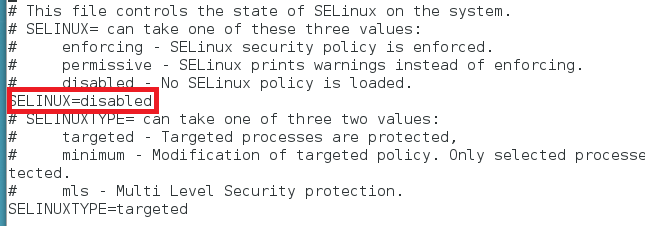
Step 3: Once installation completed, by using the below mentioned command check status of SELinux. Whether it is in which mode (enforcing, permissive or disabled). If it is in enforcing mode, execute the command semanage port -a -t mongod_port_t -p tcp 27017. If it is in disabled mode, leave as it is.
Step 4: Start DB
sudo service mongod start
Step 5: Ensure that DB service start on every restart.
sudo chkconfig mongod on
Step 6: Restart of services is required for changes to be made.
sudo service mongod stop
Step 7:
sudo service mongod restart
Step 8: After restart of service, Start the MongoDB
mongo - host 127.0.0.1:27017
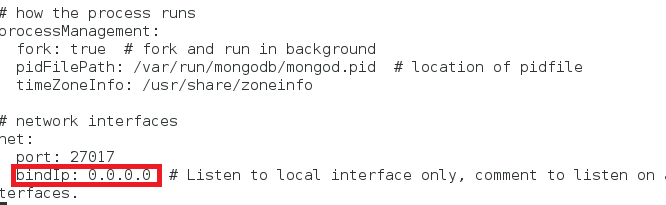
Suppose if you want to access the DB from the remote machine please make the necessary changes on the file. Change the Bind IP to 0.0.0.0

Arunachalam C
.svg)
.svg)


.avif)


