
MySQL 26.10 brings a built-in MySQL Health Monitor to Community Edition. Until now, the feature was only available on MySQL HeatWave. It watches disk, memory and host resources from inside the server and records what it sees in Performance Schema tables. The same release also adds a four-part version identifier, so you can check the exact build and update level from SQL. We tested both on a Linux host.
At a glance
The October 2026 MySQL releases include 26.10 Innovation, 9.7.4 LTS and 8.4.13 LTS. This post covers two features from the 26.10 line.
- Health Monitor: resource monitoring for disk, memory and host, with disk space forecasting, in Community Edition.
- VERSION_WITH_UPDATE(): the full MAJOR.MINOR.PATCH.UPDATE version identity.
Checking the exact version
MySQL already had VERSION(), which returns a three-part version such as 26.10.0. VERSION_WITH_UPDATE() returns the full four-part identity. On a build with no update component, the last part shows as 0.
Run the three statements below to compare them.
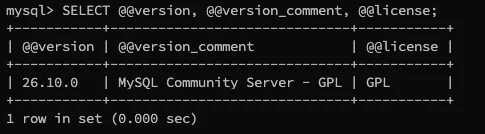
The existing VERSION() and @@version outputs keep their three-part format, so scripts that parse them do not change. A separate query confirms the edition and license. On our test host it returned MySQL Community Server - GPL.
Turning on Health Monitor
The component is installed like any other MySQL component. After it loads, it appears in mysql.component with the URN file://component_health_monitor.

Its settings are global variables that start with health_monitor. Run SHOW GLOBAL VARIABLES LIKE 'health_monitor.%'; to list them. On the test host, the disk fallback setting was OFF by default and automatic disk recovery was ON. Check the 26.10 reference manual before you change any of these in production.

A short checklist for the whole check is below.
Resource and disk monitoring
Health Monitor stores its measurements in Performance Schema tables. The health_block_device table holds one row per device sample, with the device name, timestamp, total bytes, available bytes, percent used and mount point.
The Linux root filesystem mounted at /var/lib/mysql showed 59.92% used across five samples taken within about four minutes.
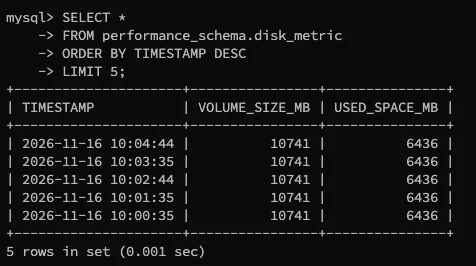
The health_process_memory and health_system_memory tables cover memory. The disk_metric table records the raw volume size and used space in megabytes. On the test host the volume was 10741 MB, with 6436 MB used at the same sample times.
Disk forecasting builds on those samples. The forecast and summary tables show projected usage and an estimated time to exhaustion. Forecasting needs enough samples before its estimate is useful, so a new server will not show a reliable forecast straight away. For a wider view of recovery planning, see our MySQL backup and recovery webinar.
Limits to know
Health Monitor is fully supported on Linux and partly supported on macOS. It is not supported on Windows in this release. Metrics that are not available on a platform show as NULL in their Performance Schema columns.
Where it fits in a DBA's day
Health Monitor is useful as an early warning, not a replacement for your existing alerting. We would use the disk summary in a daily check, and watch the used-space trend on any volume that holds the data directory or binary logs. For teams that already run DBA managed services, these checks are a good addition to the daily routine. The version function is handy in change tickets and upgrade checks, because it records the exact update level, not just the minor version.
In our view, 26.10 suits teams that want to test new capabilities before production adoption. 9.7 LTS suits teams planning a move to the newer LTS generation after compatibility testing. 8.4 LTS suits teams already standardised on MySQL 8.4 that want maintenance updates without changing release track. Teams that also need replicas for failover can look at our high availability and disaster recovery services.
Wrapping up
Health Monitor and the four-part version identifier are small additions, but they make routine checks in MySQL easier to script. If you want help setting up disk and resource monitoring across your MySQL estate, or a review of how your upgrade path fits your release plan, talk to the Geopits team. You can also book a free database audit to see where your MySQL environment stands today.
For more on tuning MySQL workloads, read how we handled Aurora MySQL query optimization for a client, or see our MySQL performance and security audit on AWS RDS. More posts are on the Geopits blog.
FAQ
- Is Health Monitor available in MySQL Community Edition?
Yes. The 26.10.0 release notes say it is now available in Community Edition, where it was previously only in MySQL HeatWave. - Which platforms does Health Monitor support?
Linux has the full metric set. macOS has basic measurements. Windows is not supported in this release. - What is the difference between VERSION() and VERSION_WITH_UPDATE()?
VERSION() returns the three-part compatibility version. VERSION_WITH_UPDATE() returns the four-part MAJOR.MINOR.PATCH.UPDATE identity. - Does disk forecasting need time to produce a result?
Yes. The forecast uses sampled history, so a new server needs enough samples before its estimate is useful. - Will the version change break scripts that parse VERSION()?
No. VERSION() and @@version keep their three-part format for compatibility.
Related reading
- Performance tuning MySQL with InnoDB parameters
- Designing a reliable MySQL backup and point-in-time recovery strategy
- MySQL versus PostgreSQL for DBAs
Sources
MySQL 26.10.0 Release Notes (dev.mysql.com/doc/relnotes/mysql/26.10/en/news-26-10-0.html); MySQL 26.10 Reference Manual, Health Monitor Component (dev.mysql.com/doc/refman/26.10/en/health-monitor-component.html).
Ajay S