Back
Database Management

Reliable database management for modern, high-performance systems.

Back
Data Modernisation

Reliable database management for modern, high-performance systems.

Back
Data Engineering

Reliable database management for modern, high-performance systems.

Back
Analytics & Intelligence

Reliable database management for modern, high-performance systems.

Back
Data Strategy Consulting

Reliable database management for modern, high-performance systems.

How to Back Up and Restore a MySQL Database with mysqldump

Rohith Reesu
Published on
November 24, 2026

mysqldump is the MySQL utility most DBAs reach for first when they need a logical backup of a database. It writes table structures and data as SQL statements, so the same file can be replayed on another server or into a fresh database. In this post, our tech team walks through a small test on MySQL 8.4.7: back up one database with mysqldump, verify the file, and restore it into a separate database. The steps are simple, but a few details matter, and we call them out along the way. If you run MySQL in production, the same habits apply to MySQL databases at any size.

At a glance

ItemDetail
Toolmysqldump, the client utility that ships with MySQL
Test serverMySQL 8.4.7 on Linux, connected on localhost
Source databasebackup_demo, one table (employees), five rows
Backup filebackup_demo.sql
Restore targetbackup_restore, created before the restore

At a glance

Backup and restore flow
  1. Create the sourcebackup_demo, employees table, five rowsDone
  2. Take the backupmysqldump writes backup_demo.sqlDone
  3. Verify the fileTable definition and all five inserts foundDone
  4. Create the targetbackup_restore, created before the restoreDone
  5. Restore the dumpmysql client loads backup_demo.sqlDone
  6. Verify the restoreemployees table with five rowsDone

Creating the target database first is required. A single-database dump has no CREATE DATABASE statement.

Backup and restore flow for backup_demo, from source to verified restore

Step by step

Step 1: Create the database and table

We created a database named backup_demo and an employees table with id (INT primary key), name and department (VARCHAR(50)) and salary (DECIMAL(10,2)). We then inserted five employee records and checked them with a SELECT.
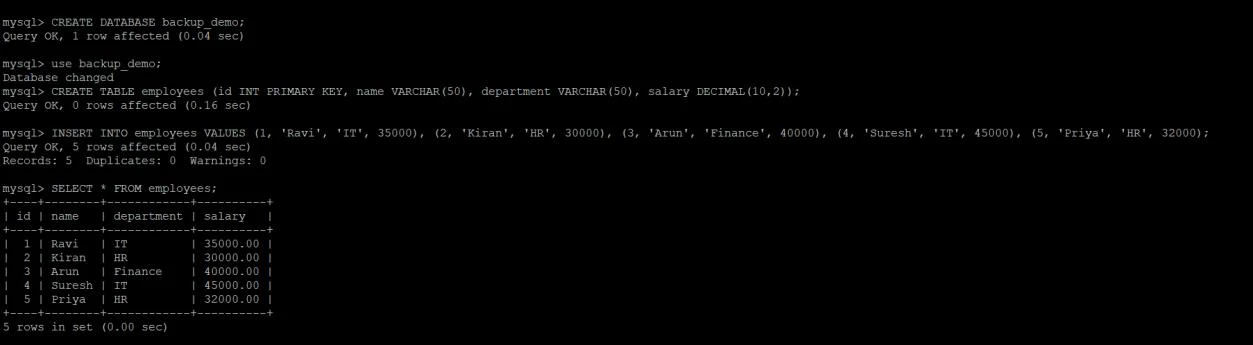
MySQL prompt: CREATE DATABASE backup_demo, the employees table with five INSERT rows, and a SELECT that returns five records.
Figure 1. Creating backup_demo, the employees table and five records.

Step 2: Take the backup with mysqldump

Run mysqldump with the database name and redirect the output to a file. Leave the password off the command line and mysqldump will prompt for it.

mysqldump -u root -p backup_demo > backup_demo.sql

Terminalmysqldump
mysql> exit;Bye[root@localhost ~]# mysqldump -u root -p backup_demo > backup_demo.sqlEnter password:

Figure 2. Running mysqldump for backup_demo.

Step 3: Verify the backup file

A backup you have not opened is only a guess. We read the top of the file and searched it for the table definition and insert statements. The header shows the dump came from server version 8.4.7. The file contains the CREATE TABLE statement for employees and an INSERT INTO statement with all five records.
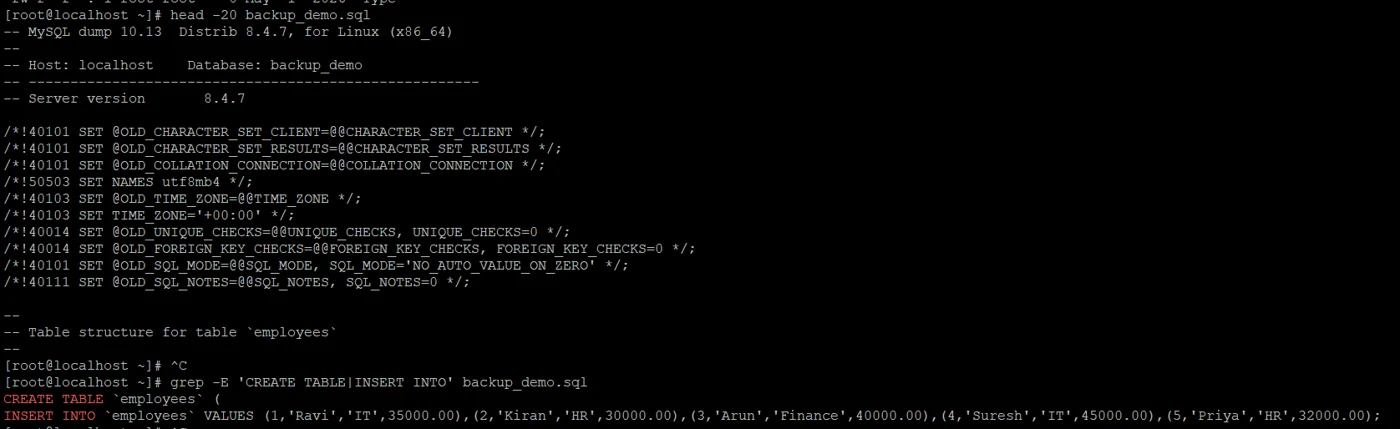
Terminal output of head -20 on backup_demo.sql showing the mysqldump header and server version 8.4.7, then a grep for CREATE TABLE and INSERT INTO.
Figure 3. Checking the header, the table definition and the insert statement in backup_demo.sql.

Step 4: Create a restore database

We restored into a separate database, backup_restore, so the original stays untouched. This step is required. A dump of a single database does not include a CREATE DATABASE statement, so the target must exist before the restore.

MySQL prompt: CREATE DATABASE backup_restore, Query OK, 1 row affected.
Figure 4. Creating the backup_restore database.

Step 5: Restore the backup

Feed the dump file to the mysql client, naming the target database.

mysql -u root -p backup_restore < backup_demo.sql

Terminal: the mysql command restoring backup_demo.sql into backup_restore.
Figure 5. Restoring backup_demo.sql into backup_restore.

Step 6: Verify the restored database

We switched to backup_restore and listed its tables. The employees table is there. A SELECT returned all five records, and COUNT(*) returned 5, which matches the source.

Terminalbackup_restore
mysql> USE backup_restore;Database changedmysql> show tables;| employees |mysql> SELECT * FROM employees;mysql> SELECT COUNT(*) FROM employees;| COUNT(*) |  5 |
Results ยท 5 rows in set
idnamedepartmentsalary
1RaviIT35000.00
2KiranHR30000.00
3ArunFinance40000.00
4SureshIT45000.00
5PriyaHR32000.00
employees5
rows restored = rows in backup_demo โœ“

Figure 6. Checking the restored employees table and its five rows.

Limits to know

mysqldump is a good fit for many jobs, but it has limits. These come from the MySQL 8.4 reference manual.

LimitWhat it meansWhat to do instead
Not built for very large databasesLogical dumps take longer to write and reload as data growsUse a physical backup tool such as Percona XtraBackup. See our guide on point-in-time recovery.
InnoDB needs --single-transaction for a consistent dumpWithout it, tables can change while the dump runsAdd --single-transaction for InnoDB tables. It only covers transactional tables such as InnoDB.
--single-transaction and --lock-tables are not combinedBoth keep a dump consistent, in different waysPick the option that fits the storage engines in use.
Restore needs an existing databaseA single-database dump has no CREATE DATABASECreate the target database first.
Routines and events are not dumped by defaultStored procedures and scheduled events can be missing from the fileAdd --routines and --events when you need them.
Views and triggers are included by defaultThey can surprise you during a restoreUse --ignore-views or --skip-triggers to leave them out.
Windows PowerShell redirectionOutput redirected in PowerShell can be saved as UTF-16, which the mysql client cannot loadUse --result-file=backup_demo.sql instead of >.

Limits to know

Where mysqldump fits in a DBA's day

mysqldump works well for small and medium databases, for copying one database to a test server, and for keeping a file before a risky schema change. For a live InnoDB database, add --single-transaction so the dump reads a consistent snapshot:

mysqldump -u root -p --single-transaction backup_demo > backup_demo.sql

A backup is only useful if the restore works. Run a restore into a scratch database on a schedule, count the rows, and keep a record of the result. If the backup plan needs a review, our DBA managed services team can help, and our high availability and disaster recovery services cover the wider picture.

Wrapping up

The commands in this walkthrough are short. The habits around them matter more: create the target first, verify the dump, test the restore, and use --single-transaction for InnoDB. For more on backup strategy, read the Geopits blog. If you want a second opinion on your MySQL backups, talk to our team or book a free database audit.

FAQ

1. Does mysqldump back up views, triggers and stored procedures?

Views and triggers are included by default. Stored routines and events are not, so add --routines and --events when you need them.

2. Do I need to create the database before restoring?

Yes, for a dump of a single database. The file has no CREATE DATABASE statement, so create the target first.

3. Can mysqldump back up a live database?

Yes. For InnoDB tables, --single-transaction gives a consistent snapshot. Large or fast-restore needs are better served by a physical backup.

4. Is mysqldump suitable for very large databases?

Usually not. Logical dumps are slow to write and reload at scale. A physical backup tool is the better fit for those cases.

5. Should the password go on the command line?

No. Leave it off so mysqldump prompts for it, or store credentials in an option file or a login path. The MySQL manual warns that a password on the command line is insecure.

Related reading

Sources: MySQL 8.4 Reference Manual, mysqldump (dev.mysql.com/doc/refman/8.4/en/mysqldump.html) and mysql batch commands (dev.mysql.com/doc/refman/8.4/en/mysql-batch-commands.html).

Rohith Reesu, DBA Associate at Geopits

Rohith Reesu

Rohith Reesu specializes in MySQL database administration, with expertise in database installation, configuration, backup and recovery, replication, and performance tuning. His technical skills include MySQL upgrades, disaster recovery, failover management, query optimization, database monitoring, and security, with a focus on maintaining reliable and high-performing database environments.

Our Latest Blogs

From monitoring to modernization, GeoPITS provides expert database management services that enhance performance, strengthen security, and reduce operational costs.

Ready to Transform Your Data?

Geopits works alongside your team as a strategic partner, starting with stabilizing your current databases, then modernizing your data infrastructure, and ultimately helping you unlock the full potential of AI.

170

Happy Clients so far

2100+

Databases Managed

142+

Successful Migrations

Thank you! Your submission has been received!
Oops! Something went wrong while submitting the form.