PostgreSQL 19 brings a strong set of improvements for database performance, developer productivity, monitoring, and production operations. The release focuses heavily on faster I/O, better query execution, more capable SQL features, and smoother management of large PostgreSQL environments.
For teams running PostgreSQL in production, the upgrade offers an opportunity to improve database throughput while gaining newer capabilities for application development and administration. A successful upgrade still requires workload testing, extension checks, backup validation, and a carefully planned migration window.
What Is PostgreSQL 19?
PostgreSQL 19 is the latest major version in the PostgreSQL release series, continuing the project's focus on reliability, standards-oriented SQL, extensibility, and high performance. The release is especially relevant for workloads that spend significant time on storage operations. PostgreSQL 19 continues the work around asynchronous I/O, helping the database handle storage activity more efficiently and giving performance improvements greater relevance for large datasets and I/O-heavy applications.
PostgreSQL 19 also expands capabilities across SQL, replication, monitoring, and database administration. These changes make the release useful for both application developers and database teams. Key PostgreSQL 19 Features at a Glance
PostgreSQL 19 Performance Improvements
1. Asynchronous I/O Improvements: PostgreSQL 19 expands asynchronous I/O capabilities, allowing database workloads to process multiple storage operations more efficiently and improve I/O throughput.
2. Faster Sequential Scans: Improvements to asynchronous I/O can accelerate sequential table scans, particularly for large datasets where storage throughput significantly influences query execution.
3. Improved I/O Parallelism: PostgreSQL 19 can issue and manage more outstanding I/O operations, helping modern storage systems maintain higher throughput during demanding database workloads.
4. Better Query Execution: Executor improvements help PostgreSQL process queries more efficiently, supporting faster execution across workloads involving scans, joins, sorting, aggregation, and filtering.
5. Enhanced Query Planner: Planner improvements help PostgreSQL select more effective execution strategies, potentially reducing unnecessary processing and improving performance for complex queries.
6. Faster VACUUM Processing: Improvements to vacuum-related processing help PostgreSQL maintain table and index health efficiently, supporting consistent performance as databases accumulate transaction history.
7. Improved Index Performance: PostgreSQL 19 includes improvements affecting index operations and maintenance, helping workloads that depend heavily on indexed lookups and database access patterns.
8. More Efficient Bulk Operations: Database improvements can benefit workloads performing substantial data movement, processing, and maintenance, particularly across large tables and high-volume production environments.
9. Better Parallel Workloads: PostgreSQL 19 continues improvements around parallel database processing, helping suitable workloads distribute computational work across available CPU resources more effectively.
10. Improved Resource Utilization: PostgreSQL 19 combines I/O, planner, executor, and maintenance improvements to help databases make more effective use of modern CPU, memory, and storage resources.
SQL and Developer Improvements
PostgreSQL 19 expands the SQL capabilities available to application developers and database engineers. New functionality can reduce the amount of application-side logic required for common database operations.
The release also continues PostgreSQL's investment in modern SQL features and standards-oriented functionality. This matters for teams building complex reporting systems, data platforms, APIs, and applications that rely heavily on database-side processing.
For developers, the value of a major PostgreSQL release often comes from several small improvements working together. Better SQL expressions, improved data manipulation capabilities, stronger JSON functionality, and more flexible database features can simplify application architecture.
PostgreSQL also continues to provide a strong foundation for relational and semi-structured data. Teams can combine traditional relational tables with JSON-based data, indexes, full-text search, extensions, and advanced query features inside the same database platform.
PostgreSQL 19 and Asynchronous I/O
Asynchronous I/O deserves special attention because storage performance has become increasingly important as database sizes grow. A database server frequently performs multiple I/O operations while executing a query. Large table scans, index access, maintenance operations, and analytical workloads can create substantial storage activity.
It allows PostgreSQL to manage these operations more efficiently. The benefit becomes particularly relevant for workloads where storage latency or throughput forms a meaningful part of query execution time. For production teams, the best evaluation approach involves measuring real workloads. Useful metrics include average query latency, p95 and p99 latency, disk throughput, I/O wait, CPU utilization, and transaction throughput.
PostgreSQL 19 for High-Availability Environments
High-availability deployments require more than a fast primary database. Replication, failover, backups, monitoring, and recovery procedures all contribute to database reliability. PostgreSQL 19 continues improvements around replication and operational workflows. These capabilities help teams build more resilient PostgreSQL architectures across primary and standby servers.
Logical replication remains particularly useful for migrations, selective data replication, integrations, and distributed database workflows. PostgreSQL's replication ecosystem also supports a wide range of architectures through native capabilities and established third-party tools. Before upgrading a production cluster, teams should verify replication health, replication slots, WAL generation, standby replay, backup recovery, and failover procedures.
PostgreSQL 19 Upgrade Guide
Upgrading to PostgreSQL 19 requires a structured migration plan that covers compatibility, testing, backups, extensions, replication, and application dependencies. A staging upgrade gives teams a practical way to validate the environment before moving the production database.
Check your current environment:
- PostgreSQL version, database sizes, extensions, replication setup, connection poolers, backups, operating system, and application dependencies
- Current database configuration and infrastructure requirements
Verify compatibility:
- PostgreSQL 19 support for installed extensions and external tools
- Application drivers and database connection libraries
- Application behavior across the complete database stack
Test in staging:
- Restore a recent production backup into a test environment
- Upgrade the staging database to PostgreSQL 19
- Run representative application workloads and review database behavior
Choose the upgrade method:
- pg_upgrade provides a practical option for major-version migrations where migration speed and operational control are priorities
- Logical replication supports staged migrations where data can synchronize between the existing and PostgreSQL 19 environments before application traffic moves to the new database
Using pg_upgrade for PostgreSQL 19
pg_upgrade provides a faster path for many major-version upgrades because it can reuse existing database files while converting the cluster to the newer PostgreSQL version. A typical upgrade workflow begins with installing PostgreSQL 19 alongside the existing version. Administrators then validate the old cluster, run compatibility checks, stop application traffic during the migration window, execute the upgrade, and complete post-upgrade maintenance.
A simplified command structure can look like this:
pg_upgrade \
  --old-bindir=/usr/lib/postgresql/18/bin \
  --new-bindir=/usr/lib/postgresql/19/bin \
  --old-datadir=/var/lib/postgresql/18/main \
  --new-datadir=/var/lib/postgresql/19/main
The exact paths vary by operating system and installation method. Production teams should follow the PostgreSQL 19 documentation for the platform-specific upgrade procedure and test the complete process in a staging environment first.
Post-Upgrade PostgreSQL 19 Checklist
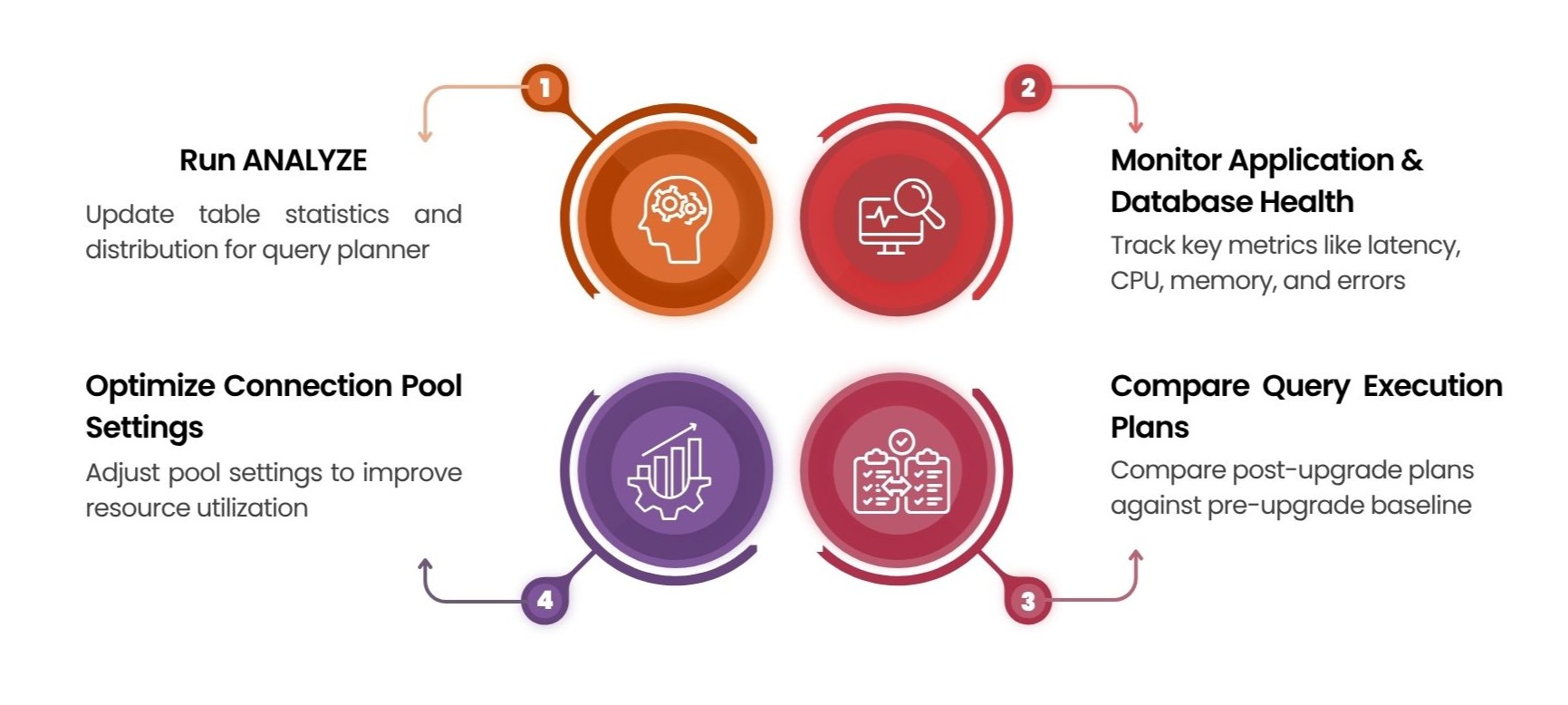
- Run ANALYZE immediately post-upgrade so the query planner has updated table statistics and distribution information.
- Monitor overall application and database health closely, tracking metrics such as query latency, database connections, CPU, memory, disk activity, transaction rates, locks, replication lag, and error rates.
- Compare key query execution plans and performance against the pre-upgrade baseline to catch any planner decision changes.
- Review and optimize connection pool settings to prevent unnecessary pressure on PostgreSQL and ensure optimal resource utilization.
Who Should Upgrade to PostgreSQL 19?
- Large production databases: If you’re running big datasets at scale, 19 is worth a serious look.
- I/O-heavy workloads: Teams hitting storage or throughput limits stand to gain the most.
- Modern application stacks: Newer SQL and operational features suit teams building on current tooling.
- Stable apps with heavy custom extensions: Hold back and test compatibility first. These setups carry the most upgrade risk.
- Teams already planning infrastructure changes: Fold the major-version jump into the same project, alongside storage upgrades, monitoring updates, connection-pooling tuning, and backup validation.
- Everyone, before production: Run a staging migration first. It’s the only reliable way to know whether the upgrade is safe for your setup.
Conclusion
PostgreSQL 19 brings meaningful improvements for database performance, modern SQL capabilities, and production operations. Its advances in asynchronous I/O can benefit I/O-intensive workloads, while the broader release gives developers and database teams more capable tools for building and managing applications.
A successful PostgreSQL 19 upgrade starts with careful preparation. Review extensions and dependencies, test the upgrade in staging, validate backups and replication, and measure performance against real workloads. With a structured migration plan and thorough testing, teams can move to PostgreSQL 19 with greater confidence and take advantage of its latest capabilities.
Frequently Asked Questions
1. What are the key features of PostgreSQL 19?
PostgreSQL 19 introduces improved asynchronous I/O, query execution, SQL capabilities, monitoring, replication workflows, and database administration features for modern production workloads.
2. Does PostgreSQL 19 improve database performance?
Yes. PostgreSQL 19 improves I/O efficiency, sequential scans, query execution, query planning, VACUUM processing, index performance, parallel workloads, and overall resource utilization.
3. What is asynchronous I/O in PostgreSQL 19?
Asynchronous I/O allows PostgreSQL to manage multiple storage operations more efficiently, improving throughput for large datasets and I/O-intensive database workloads.
4. How do I upgrade to PostgreSQL 19?
A PostgreSQL 19 upgrade requires compatibility checks, backup validation, extension testing, staging migration, replication verification, and a planned production migration using tools such as pg_upgrade or logical replication.
5. Is PostgreSQL 19 suitable for production databases?
Yes. PostgreSQL 19 is particularly relevant for large production databases, I/O-intensive workloads, modern applications, and teams seeking improved performance and newer SQL and operational capabilities.
Vimal V