.svg)
.svg)
.svg)


.svg)


.svg)
.svg)

.svg)

Database migration testing checks that a moved database keeps its structure, records, query results, and speed. Compare the source and target with row counts, checksums, and sample queries, load-test the new system, and rehearse a rollback before any data migration goes live.
Key Takeaways
- Validate schema first, because keys, types, and indexes must match before any record comparison means anything.
- Matching row counts prove rows arrived; checksums and field-level comparisons prove the values are correct.
- Load-test with production-sized data, since a data migration can pass accuracy checks and still run slowly.
- Rehearse the rollback plan before cutover and keep the source database read-only until sign-off.
Copying the tables is the easy bit. What happens afterward is where projects go sideways: a timestamp column that drifted by five and a half hours, a nightly report that used to take two seconds and now takes forty, and a permissions group nobody remembered to recreate. Nobody spots these on launch day. Someone in finance spots them three weeks later, squinting at a total that looks a little off.
Gartner has put the average yearly cost of poor data quality at $12.9 million per organization, and a data migration is one of the easiest moments to let that damage in, since every table, job, and login gets touched in the same window. Size worsens it. McKinsey and the University of Oxford studied more than 5,400 large IT projects and found they ran 45 percent over budget on average while delivering 56 percent less value than predicted.
This guide walks through database migration testing in the order you would actually do it. Schema first, then records, then queries, then speed, and finally the escape route. Developers, QA leads, and project managers can each lift out the piece that is theirs.
What Is Data Migration Testing, and Why Does It Matter?
Data migration testing is the structured process of verifying and validating data before, during, and after it moves from a source system to a target system to ensure accuracy, completeness, and consistency. To know more about the basics, read the Basics of Data migration.
Why It Matters
What Are the Four Types of Database Migration Testing?
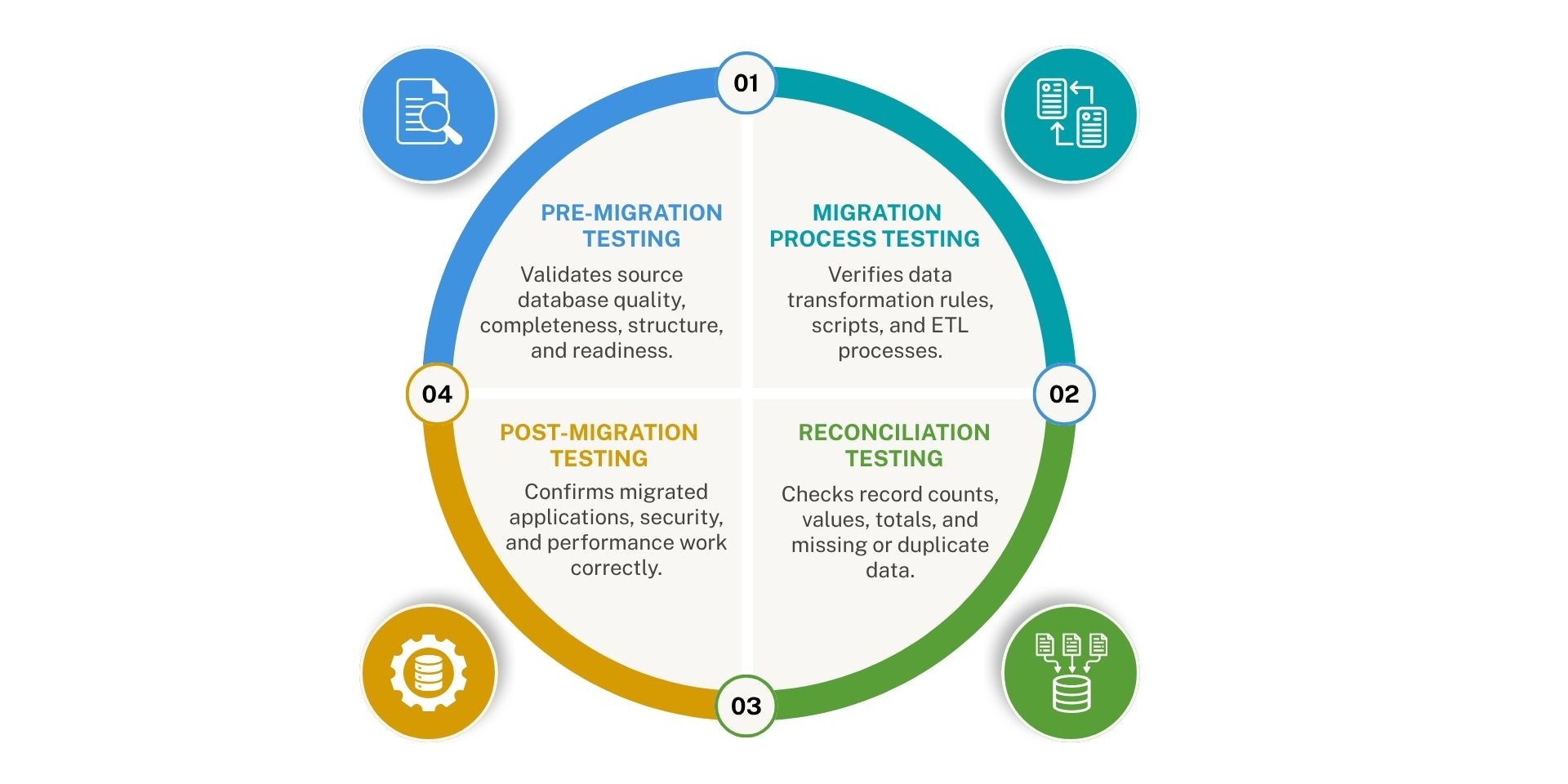
Database migration testing is generally broken down into four main phases or types of testing corresponding to the lifecycle of the data move: pre-migration testing, migration process testing, post-migration testing, and reconciliation (or validation) testing.
1. Pre-Migration Testing
- What it is: Checks the source database and data format before any movement begins.
- Why it matters: Ensures the source data is clean, complete, and ready to be mapped without hidden corruptions.
2. Migration Process Testing
- What it is: Monitors the active transfer and transformation phase.
- Why it matters: Confirms that scripts, data mapping rules, and ETL (Extract, Transform, Load) pipelines convert formats and move fields correctly
3. Post-Migration Testing
- What it is: Evaluates the target database after the transfer finishes.
- Why it matters: Verifies that application functions, security controls, and general system performance operate properly in the new environment.
4. Reconciliation Testing
- What it is: Compares the source and target databases side-by-side.
- Why it matters: Guarantees that record counts, numeric totals, and data values match completely with no missing or duplicated records.
How Do You Plan a Data Migration Testing Strategy?
A data migration testing strategy defines what will be tested, how success is measured, and when each test runs. Start with scope, set pass or fail criteria, capture a baseline, and schedule several rehearsals before cutover.
- Define the scope: List every database, schema, table, view, stored procedure, trigger, and scheduled job involved in the move. Mark the business-critical assets, such as customer, billing, and transaction tables, so they receive deeper validation than low-risk data like log archives.
- Set acceptance criteria: Document measurable pass and fail rules before testing begins.
- Capture a baseline: Record row counts, checksums, sample query outputs, and response times from the source database before any changes are made. Without baseline figures, there is nothing reliable to compare the target against.
- Run multiple rehearsals: Plan at least two or three full trial migrations in a production-like environment. Each rehearsal surfaces different issues, including script errors, timing gaps, and data quality problems that a single test would miss.
- Assign clear ownership: Every test needs a named owner, whether that is a DBA, QA engineer, or developer. Accountability keeps validation from being overlooked as the go-live date approaches.
A defined strategy also makes the process repeatable. Once the criteria and baselines are documented, every later data migration can reuse the same framework.
What Is Schema Validation in Data Migration Testing
Schema validation confirms that the database structure in the target matches the source after a data migration. Compare tables, columns, data types, constraints, indexes, and other objects one by one, and document every difference as either an approved change or a defect.
Schema validation is the fastest layer of database migration testing to automate. It also catches structural errors early, before time is spent on data or performance checks.
Objects to validate:
- Table and column names, order, and count
- Data types, lengths, precision, and scale
- Nullability and default values
- Primary keys, foreign keys, unique constraints, and check constraints
- Indexes, including type and column order
- Views, stored procedures, functions, triggers, and sequences
- Character set and collation settings
Watch for engine-specific differences: When the source and target run on different database engines, the same definition can behave differently. Oracle, for example, treats an empty string as NULL, while PostgreSQL treats it as a distinct value. A column that worked correctly for years can return different results after the move, and the database will not raise an error. Numeric data types, date handling, and auto-increment logic need the same careful review.
Compare metadata on both sides: Query the information schema on the source and target database, export both results, and run a diff:
SQL
SELECT table_name, column_name, data_type, is_nullable
FROM the information schema. columns
WHERE table_schema = 'public'
ORDER BY table_name, ordinal_position;
How Do You Test Data Integrity and Reconcile Data After a Data Migration?
Data integrity testing confirms that every record in the target database is complete, accurate, and identical in meaning to the source. Data reconciliation is the comparison process, moving from broad checks such as row counts to precise checks such as field-level comparisons.
Follow these steps in order, starting with the fastest checks and ending with the most detailed.
Step 1: Compare row counts
Count the rows in every table on both the source and target databases. This takes only minutes and exposes missing batches right away. Matching counts confirm that records arrived, but they say nothing about whether the values are correct.
Step 2: Compare aggregate values
Calculate the sum, minimum, maximum, and average of numeric and date columns, such as amounts, quantities, and transaction dates. Differences here point to rounding, truncation, or conversion errors.
Step 3: Validate with checksums
Generate a hash for each row or each chunk of a large table, then compare the results. This confirms that content matches across millions of records without reviewing each one manually.
SQL
SELECT MD5(STRING_AGG(CONCAT_WS('|', id, email, balance), ',' ORDER BY id))
FROM customers;
Step 4: Run field-level comparisons on samples
For high-risk tables, select a random sample and add edge cases: the oldest and newest records, null values, special characters, and very long text. Compare each field individually between the two systems.
Step 5: Verify relationships between tables
Check for orphaned records, meaning child rows that reference a parent record that does not exist in the target. Orphans usually indicate that tables were loaded in the wrong order or that a foreign key was dropped.
SQL
SELECT o.order_id
FROM orders o
LEFT JOIN customers c ON o.customer_id = c.customer_id
WHERE c.customer_id IS NULL;
Common data issues to look for:
- Truncated text values
- Changed decimal precision
- Time zone shifts in timestamp columns
- Character encoding damage, such as accented letters turning into symbols
- Null values swapped with empty strings
Account for changes during migration: On live systems, new records keep arriving while the copy runs. Use change data capture or an agreed freeze window so the target database does not go live already out of date.
How Do You Validate Queries and Application Performance in a Migrated Database?
Query and application testing confirms that reports, stored logic, and user-facing functions return the same results on the target database as on the source. Run identical queries on both systems, compare the output, and test the application end-to- end before go-live.
A database can be copied perfectly and still break an application, because each engine interprets the same SQL in its own way. Work through these steps to catch those gaps.
Step 1: Build a query test set: Pull the most frequent and most resource-heavy queries from query logs or monitoring tools. Add every report the business depends on, including month-end and year-end jobs that run rarely but carry high importance.
Step 2: Compare results, not just completion: A query that finishes without an error can still return different data. Check row counts, sort order, rounding, and null handling in the output of both systems.
Step 3: Test stored logic: Stored procedures, triggers, and functions often contain the most subtle differences between engines. Execute each one with known inputs and confirm the outputs match the source.
Step 4: Test the application layer: Run integration and regression suites, and confirm that login, search, checkout, reporting, and export functions work as expected. Verify connection strings, database drivers, and timeout settings, since a new driver can behave differently under load.
Step 5: Test write operations: Insert, update, and delete records through the application, then confirm they are saved correctly. Check auto-increment IDs, sequences, and default values as part of this step.
Common query-level differences to look for:
- Default sort order that varies between engines
- Case sensitivity changes in string comparisons
- Date and time format differences
- SQL syntax that one engine accepts and another rejects
Document each mismatch, identify whether it comes from the query, the data, or the engine, and fix the cause before repeating the test. To know more about optimizing SQL queries, read How to Optimize SQL Queries for Better Performance: 13 Tips and Tricks
What Should You Measure When Testing Database Performance After a Data Migration?
Performance testing compares the speed and capacity of the target database against the source baseline under realistic load. Replay production query patterns at normal and peak volume, then track response time, throughput, and resource use to confirm the new system performs as well as the old one.
A database can hold every record correctly and still feel broken when pages take eight seconds to open. These steps help you find slowdowns before users do.
Track the right metrics:
Refresh statistics and review execution plans: After a bulk load, optimizer statistics are often stale or missing, which leads to poor query plans. Update them, then compare execution plans for your slowest queries. A missing index or a changed plan is a common cause of post-migration slowdowns.
Test batch jobs, backups, and maintenance windows: Nightly ETL runs and scheduled backups must still finish within their allotted time.
Check the cost impact for cloud targets: Instance size, storage tier, and network distance affect both speed and monthly spend. Flexera's State of the Cloud reports, widely covered by Forbes, have put wasted cloud spend at roughly 27 to 32 percent in recent editions. If the new environment only keeps up on an oversized instance, identify that before sign-off.
Which Tools Help With Database Migration Testing?
Where Do Data Migration Projects Most Often Go Wrong?
Most data migration failures come from a short list of avoidable testing gaps.
- Testing with small or fake data: Use production-sized data, masked where privacy rules require it.
- Relying on row counts alone: Matching totals miss corrupted or altered values.
- Skipping edge cases: Test nulls, leap-day dates, special characters, and legacy records.
- Delaying performance testing: Late testing leaves no time for index tuning or redesign.
- Overlooking security: Verify users, roles, and permissions as carefully as tables.
- Skipping the rollback rehearsal: Run the rollback at least once before cutover day.
How Does Geopits Help With Data Migration Testing?
Geopits builds testing into every phase of a database move: baseline capture, automated schema and data comparison, query and application regression checks, load testing, and rollback rehearsal.
The advantage of an outside team is mostly pattern recognition. Engineers who have watched the same failures play out across several engines and cloud platforms spot warning signs sooner, and they arrive with test suites already built. If you're weighing a new platform or trying to rescue a stalled data migration, a short assessment of your current environment is a sensible first step.
Frequently Asked Questions
1. How long does database migration testing take?
It depends on size and complexity. A small database may need a couple of weeks. An enterprise system with hundreds of tables and dependent applications can take several months across multiple rehearsals.
2. What are some tools for data migration testing?
Top tools for data migration testing include automated data validation platforms, ETL frameworks, and cloud-native verification services designed to compare source and target data.
3. What is the difference between data validation and migration testing?
Validation checks whether data follows rules such as format and completeness. Migration testing is wider. It covers schema, integrity, queries, speed, security, and recovery across the whole move.
Conclusion
Good database migration testing requires discipline. Capture a baseline, validate the schema, prove data integrity beyond row counts, compare query results, load-test under real conditions, and rehearse the way back. Each layer catches a different kind of problem, and together they make a risky data migration a controlled one.
Start early, automate what you can, and treat every rehearsal as a chance to find defects while they're cheap. If your team wants a second set of eyes or a ready-made framework, Geopits can help from planning to go-live.
.svg)

.svg)

.avif)


