.svg)
.svg)
.svg)


.svg)


.svg)
.svg)

.svg)

Database that run for a year, will grow easily to TB of Data's. When it develops very large, it's very difficult maintain.
Table Partition is of the way to deal with table that has large volumes of data's (rows).
By using table partition, we can Split the VLT (Very Large table) into multiple pieces based on the requirements.
By splitting, we can achieve the good performance and easy maintenance (Taking Backups and Index Rebuild and Reorg).
Consider that we have VLT that has 1 TB of data. In which only recently added 500 GB are accessed frequently, page split may occur very high for this 500 GB data. In this case, we have to perform the index rebuilt to improve the read operation. We know that index rebuilt, need very large amount of disk space.
If we partitioned the table, instead of doing index rebuilt for the entire table, we can perform this for recently added 500 GB.
Things needs to be known before implementing the table partition.
A. Partition function
B. Partition scheme
C. Table on Partition scheme
Partition function
It plays vital role in table partition by allowing us to define a boundary point. Very large table splits into pieces by specifying the boundary point.
Consider below example of VLT that contains the data starting from the year 2005 to 2018.
Our target is to partition data from the year 2013 to 2018 for that specify the boundary point value as 2013 Jan 1st 12:00AM. So the transaction dated from 01-01-2013 will move to the partitioned table.
Below example is for creating a partition function
Use BankTrans
go
Declare @limit Datetime
select @limit='20130101'
create partition function p_fun_right (Datetime) As
Range Right for values (@limit)
Partition scheme
Once the partition function specifies the boundary point, scheme tell us file name to store the partitioned data.
Note: Before creating please check whether appropriate file group and .ndf are created.
Create partition scheme psch_rt As
Partition p_fun_right To
([Primary],[year2013]) - - - - - - -file group name
Table on Partition scheme
create table Bank_Trans
(
Trans_ID varchar (50),
Transcation_Desc VARCHAR (10),
Customer_Name Varchar (15),
Trans_Date Datetime,
primary key (Trans_date)
)
ON psch_rt (Trans_date)
insert into Bank_Trans values (01,'Debit', 'Gorge','2013-05-14')
insert into Bank_Trans values (02,'Credit', 'Willams','2013-05-15')
insert into Bank_Trans values (03,'Credit', 'Robert','2011-04-14')
insert into Bank_Trans values (04,'Debit', 'Jackson','2015-05-05')
insert into Bank_Trans values (05,'Credit', 'Mike','2007-05-05')
Below TSQL commands gives us some useful information about partitions.
select * from sys.partitions where object_name(object_id) = 'Bank_Trans'
Output

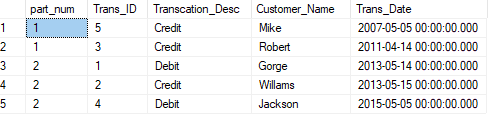
select $partition.p_fun_right(trans_date) as part_num, * from dbo.bank_trans
By using this command, we can check which rows are stored in the which partition. As we have defined transaction dated 01-01-01-2013 should move on to the partition 2 (Year2013)
Output
select * from sys.partitions where object_name(object_id) = 'Bank_Trans'
Output

select * from sys.partition_functions
This TSQL command tells us about the partition function name and whether it is range right or left.
FanOut defines the range value. Number of ranges that we have is 2.
Output

select * from sys.filegroups
It gives us information about, Number of file group that we have created.
Primary - It is default file group that was create, when we create the database.
Output

Arunachalam C
.svg)
.svg)