PostgreSQL does not overwrite a row when you update it. It writes a new version and keeps the old one, and a delete works the same way: the row is marked as gone, not erased. Over time those leftovers, called dead rows, make a table bigger and queries slower. PostgreSQL VACUUM is the command that cleans them up. Plain VACUUM and VACUUM FULL do different jobs, though, and the choice is easier to make once you have seen the numbers.
We ran a simple test on a local PostgreSQL 16 instance. We created a table, bloated it with updates and deletes, ran VACUUM, then ran VACUUM FULL, and checked the table size at every step. Everything below comes from that run, and the screenshots show the real output.
VACUUM explained simply
Why do dead rows exist?
PostgreSQL keeps the old version of an updated row because another session may still be reading it. Once nobody can need that old version, it becomes a dead row. The PostgreSQL documentation says these tuples stay in the table until a VACUUM is run, which is why regular cleanup matters most on tables that change often.
What does VACUUM do?
VACUUM walks through the table, finds dead rows that nobody needs, and marks their space as free so new rows can reuse it. It also does routine maintenance that keeps the table healthy over time. Plain VACUUM does not take an exclusive lock, so normal reads and writes keep working while it runs.
Do I have to run it myself?
Usually not. Autovacuum is a background process that is on by default. It wakes up regularly and vacuums any table that has changed enough. Running VACUUM by hand is for special cases, such as after a big delete or a bulk update, or on a table that changes faster than autovacuum keeps up. If you are not sure whether autovacuum is keeping up on your estate, our DBA managed services team checks this as part of routine care.
Why is VACUUM FULL different?
Plain VACUUM keeps the freed space inside the same file so the table can reuse it. VACUUM FULL writes a new copy of the table with no extra space and swaps it in, so unused space can go back to the operating system. The cost is real. The table is locked exclusively while the rewrite runs, and you need enough free disk for the new copy.
What do VERBOSE and ANALYZE add?
VERBOSE does not change the cleanup. It prints a report of what VACUUM did, which helps when you want to check the result. ANALYZE adds a second job: after cleaning, it refreshes the statistics that PostgreSQL uses to pick query plans. You can run both in one command with VACUUM (VERBOSE, ANALYZE) tablename;
The test, step by step
The tests used the same table throughout, so each screenshot builds on the one before it. Version note: the test ran on PostgreSQL 16, and PostgreSQL 19 is now the current release. The behaviour described here is documented for both, but check the PostgreSQL 19 upgrade guide if you are planning a move.
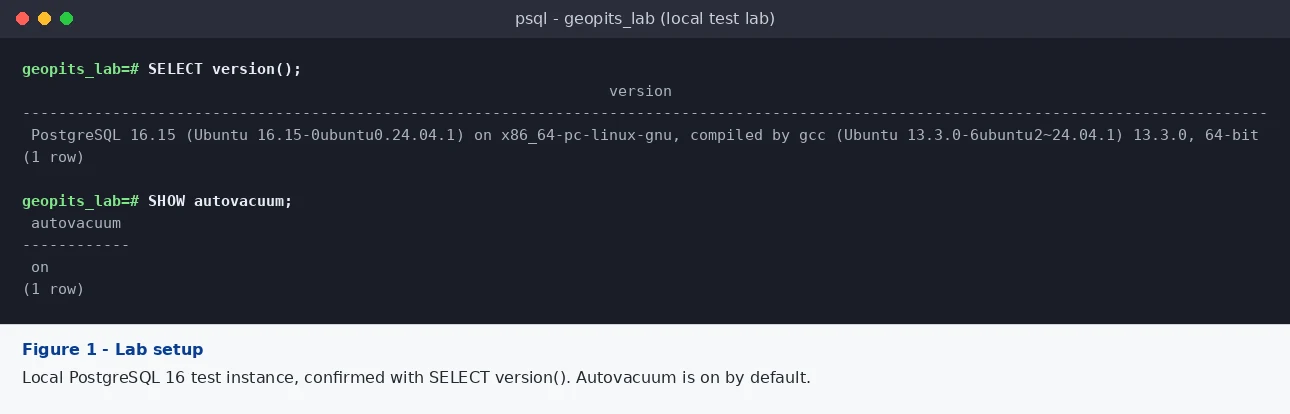
Step 1 of 6: The setup
A local PostgreSQL 16 instance with autovacuum left on at its default. The SHOW autovacuum output confirms it is on.
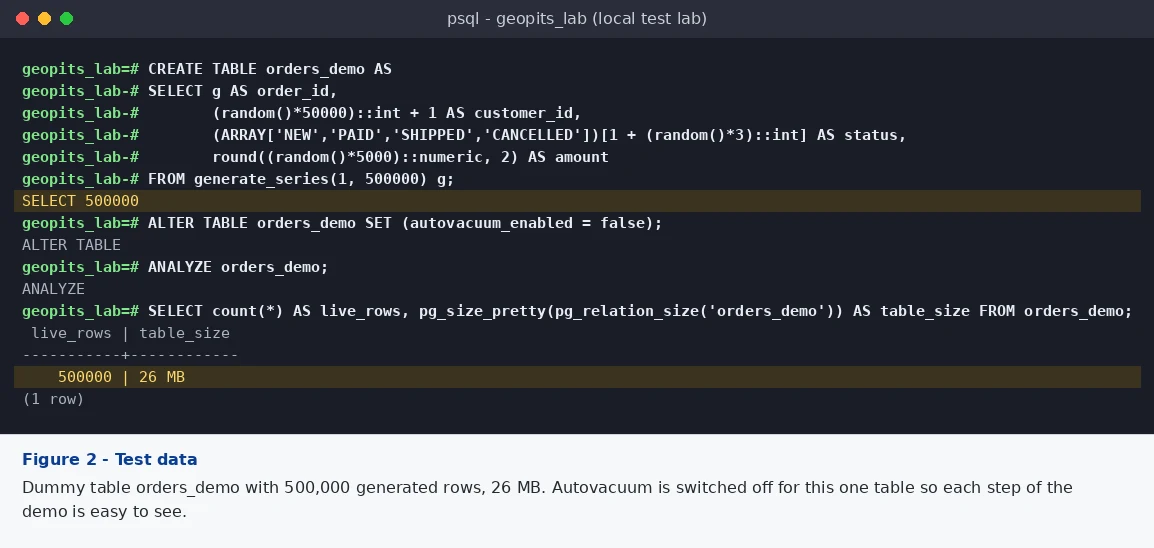
Step 2 of 6: A table to work with
One table, orders_demo, with 500,000 generated rows, at 26 MB. Autovacuum is switched off for this one table so every step stays visible.
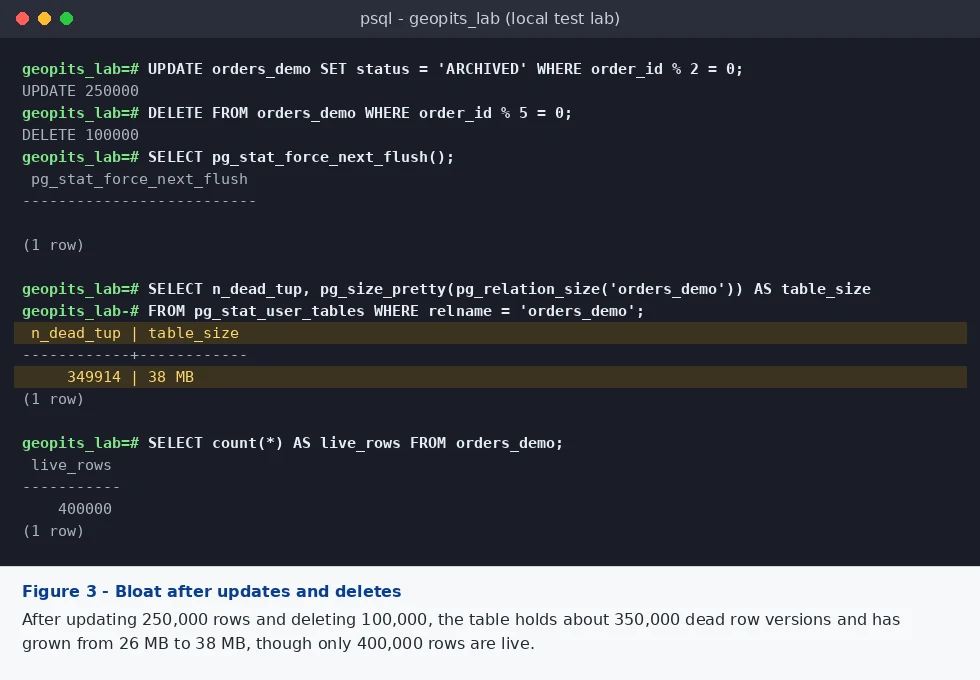
Step 3 of 6: Creating bloat
We updated 250,000 rows and deleted 100,000 more. The statistics view then shows 349,914 dead rows, and the table file has grown from 26 MB to 38 MB, even though only 400,000 rows are still live. Updates and deletes leave dead rows behind, and the file grows with them.
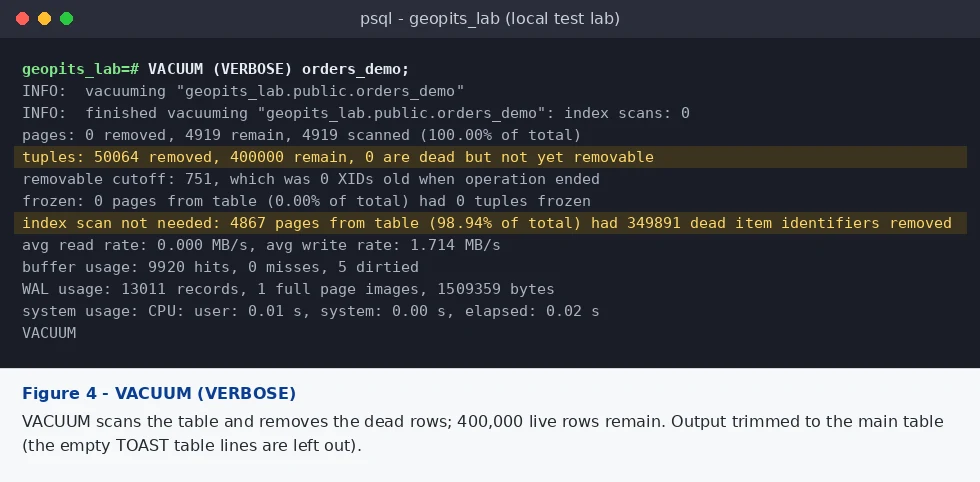
Step 4 of 6: Running VACUUM
Next, plain VACUUM with VERBOSE. The report shows two counts: tuples removed from the table, and dead item identifiers removed from the indexes. The numbers are different, so read the whole report rather than a single line. Pages removed is 0, which is why the file size does not change yet.
Step 5 of 6: Checking the result
Dead rows are now 0. The file is still 38 MB. Plain VACUUM makes the space reusable inside the table, but in most cases it does not hand that space back to the operating system.

Step 6 of 6: Giving the space back
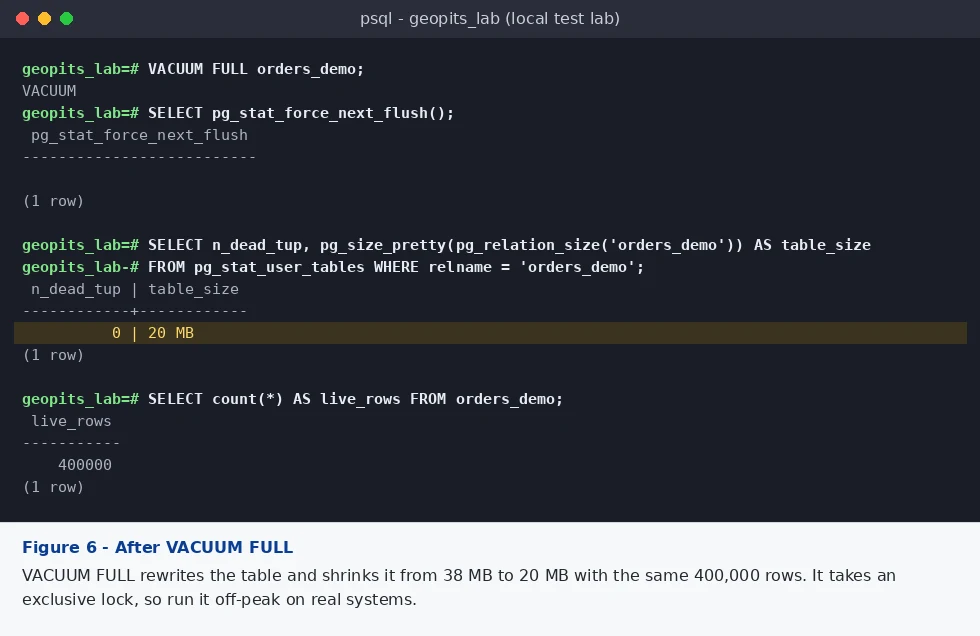
VACUUM FULL rewrites the table into a new, compact file. The file drops from 38 MB to 20 MB, with the same 400,000 live rows and 0 dead rows. The table is locked while this runs, so plan it for a quiet period.
The numbers at a glance
StageDead rowsTable sizeFresh table, 500,000 rows026 MBAfter updates and deletesabout 350,00038 MBAfter VACUUM038 MBAfter VACUUM FULL020 MB
- Updates and deletes leave dead rows behind, and the table file grows even though fewer rows are live.
- Plain VACUUM removes dead rows and keeps the space for reuse. It usually does not shrink the file.
- VACUUM FULL returns space to the operating system, but locks the table while it runs. Use it off-peak.
Which one should you use?
SituationWhat to doNormal day-to-day cleanupLeave it to autovacuumAfter a big delete or bulk updateVACUUM tablename;Table is much bigger than its data needs, and you can take a lockVACUUM FULL tablename; during an off-peak windowYou only want to know how bad it isCheck n_dead_tup in pg_stat_user_tables
Commands to keep handy
-- which tables have the most dead rows
SELECT relname, n_dead_tup
FROM pg_stat_user_tables
ORDER BY n_dead_tup DESC;

-- clean one table and show what happened
VACUUM (VERBOSE, ANALYZE) tablename;

-- shrink one table (locks it while it runs)
VACUUM FULL tablename;

-- see a vacuum that is running right now
SELECT * FROM pg_stat_progress_vacuum;
Limits to know
The PostgreSQL documentation sets these limits for VACUUM. Plan around them before a production run.
LimitWhat it meansWhat to do insteadPlain VACUUM usually does not shrink the fileFreed space is reused inside the table, and the file size often stays the sameUse VACUUM FULL off-peak if you need the space backVACUUM FULL takes an exclusive lockReads and writes on the table wait while it runsSchedule a maintenance window and check the lock impact firstVACUUM FULL needs free disk for a new copyThe disk can fill up during the rewriteCheck free space before you startPARALLEL cannot be used with FULLParallel index cleanup applies to plain VACUUM onlyUse plain VACUUM when you need parallel workersAutovacuum can fall behind on heavy write tablesDead rows build up between runsCheck n_dead_tup after large batch jobs
Where it fits in a DBA's day
After a large batch job, check n_dead_tup for the tables you touched. If a table is far bigger than its data needs and you can take a lock, schedule VACUUM FULL in a quiet window and watch progress in pg_stat_progress_vacuum. For a wider look at slow queries and bloat, read our guide to PostgreSQL performance tuning for slow databases. Our database performance tuning services cover this work on production estates, and a PostgreSQL performance incident case study shows how it looks in practice. Background on the platform is on our PostgreSQL technology page.
Wrapping up
Dead rows are a normal part of how PostgreSQL works, and autovacuum handles most of the routine cleanup. Know the difference between plain VACUUM and VACUUM FULL, check dead rows after large changes, and plan the lock before you run a full rewrite. If you want a second opinion on bloat or autovacuum behaviour in your production databases, start with a free database audit or talk to our team. You can find more DBA write-ups on the Geopits blog, and our full range of services is listed on the website.
FAQ
1. Does VACUUM remove dead rows from disk?
It frees the space inside the table so PostgreSQL can reuse it. In most cases the file size stays the same. VACUUM FULL is the form that returns space to the operating system.
2. Do I need to run VACUUM manually?
Usually not. Autovacuum is on by default and handles routine cleanup. Run VACUUM by hand after a big delete or bulk update, or when a table changes faster than autovacuum keeps up.
3. Can I run VACUUM while the application is live?
Yes, plain VACUUM runs alongside normal reads and writes. VACUUM FULL takes an exclusive lock on the table, so run it during an off-peak window.
4. How do I see which tables have the most dead rows?
Query n_dead_tup in pg_stat_user_tables, ordered from highest to lowest, as shown in the commands above.
5. Is VACUUM FULL safe on a production table?
The data is safe, but the table is locked while the rewrite runs and you need enough free disk for the new copy. Check free space first and plan a quiet window.
Related reading
- Aurora PostgreSQL upgrades: what to plan for
- RDS and Aurora PostgreSQL: performance and cost efficiency (webinar)
- PostgreSQL 19: new features and upgrade guide
Sources: PostgreSQL 16 documentation, VACUUM command (https://www.postgresql.org/docs/16/sql-vacuum.html). Test output from a local PostgreSQL 16 instance on the Geopits tech team.

Guru Charan